
Image2Studio
Examples

gpt-image-2

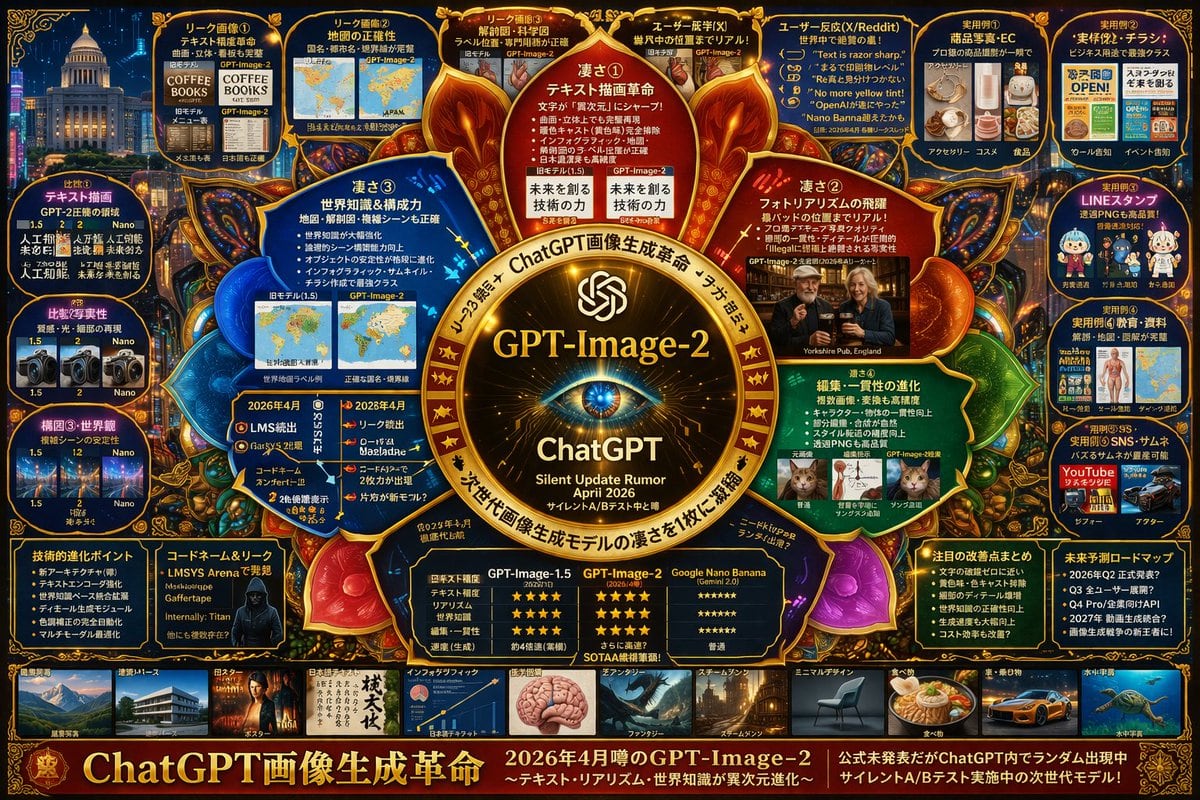
Highly Dense Futuristic Infographic Poster

Ready-to-edit highly dense futuristic infographic poster image prompt.

Ready-to-edit highly dense futuristic infographic poster image prompt.
Prompt

{ "type": "highly dense futuristic infographic poster", "style": "dark background with {argument name=\"theme color\" default=\"gold and dark blue\"} neon accents, highly structured grid and radial layout, tech-focused UI aesthetics", "centerpiece": { "visual": "{argument name=\"centerpiece icon\" default=\"glowing cybernetic eye lens\"} surrounded by a golden ornate circular frame with glowing nodes", "text": ["{argument name=\"model name\" default=\"GPT-Image-2\"}", "ChatGPT", "Silent Update Rumor {argument name=\"release date\" default=\"April 2026\"}"] }, "layout": { "inner_circle_panels": { "count": 4, "description": "Four wedge-shaped panels surrounding the center detailing core features", "labels": ["凄さ① テキスト描画革命", "凄さ② フォトラリアズムの飛躍", "凄さ③ 世界知識&構成力", "凄さ④ 編集・一貫性の進化"] }, "top_row": { "count": 5, "description": "Rectangular panels showing leak images, map accuracy, anatomical diagrams, and user reactions", "labels": ["リーク画像①", "リーク画像②", "リーク画像③", "ユーザー反応(X)", "ユーザー反応(X/Reddit)"] }, "left_column": { "count": 3, "description": "Vertical stack of comparison panels showing version 1.5 vs 2 vs Nano with small image grids", "labels": ["比較① テキスト描画", "比較② 写実性", "構図③・世界観"] }, "right_column": { "count": 5, "description": "Vertical stack of practical use cases with small example images", "labels": ["実用例① 商品写真・EC", "実用例② 実務・チラシ", "実用例③ LINEスタンプ", "実用例④ 教育・資料", "実用例⑤ SNS・サムネ"] }, "bottom_data_section": { "count": 5, "description": "Data tables, bulleted lists, and hacker imagery", "labels": ["技術的進化ポイント", "コードネーム&リーク", "性能比較表 (GPT-Image-1.5 vs GPT-Image-2 vs Google Nano Banana)", "注目の改善点まとめ", "未来予測ロードマップ"] }, "bottom_thumbnail_strip": { "count": 10, "description": "A horizontal row of small square images demonstrating different generation styles", "labels": ["建築", "ポスター", "日本語テキスト", "インフォグラフィック", "ファンタジー", "スチームパンク", "ミニマルデザイン", "食べ物", "車", "水中"] } }, "footer": { "text": "{argument name=\"main title\" default=\"ChatGPT画像生成革命\"}", "subtext": "2026年4月噂のGPT-Image-2" } }

Prompt structure
  • Modelgpt-image-2
  • Use casesocial-media-post
  • Styleeditorial, cyberpunk, photorealistic, luxury
  • Aspect ratioFlexible
Best used for
  • Use casesocial-media-post
  • Styleeditorial, cyberpunk, photorealistic, luxury
  • Recommended specs1:1, 4:5, 16:9, or 9:16
  • ModelGPT Image 2
How to customize

Use this Highly Dense Futuristic Infographic Poster prompt as a base. Replace the subject, product details, environment, lighting, brand colors, and output ratio while keeping the social-media-post intent and editorial, cyberpunk, photorealistic, luxury direction stable.

Editable variables
  • SubjectReplace the product, person, scene, interface, or object being generated.
  • Use caseKeep or rewrite the destination as social media post, ad creative, cover image, poster, or ecommerce hero.
  • FrameChoose 1:1, 4:5, 16:9, or 9:16 based on the final placement.
  • Brand cuesAdd colors, materials, props, text-safe space, and the platform where the image will be used.
Recommended specs

Choose the frame for the destination first, then use 1K, 2K, or 4K based on output quality needs. Product images and posters usually benefit from higher resolution.

Pre-generation checklist
  • CheckSubject, lighting, composition, and frame are specific enough to review.
  • CheckText-safe space is included when the image will carry a headline or ad copy.
  • CheckResolution, credit cost, and final destination are checked before generation.
Why this prompt works

Highly Dense Futuristic Infographic Poster works because it starts from the image job, then controls subject, composition, lighting, style, and frame. It is best for social media post while keeping the editorial, cyberpunk, photorealistic, luxury direction stable.

Common questions
  • Can I use it directly?Yes. Replace the subject, brand cues, and frame, then generate in Image2Studio.
  • Which ratio should I use?Choose 1:1, 4:5, 16:9, or 9:16 based on the destination.




