
Image2Studio
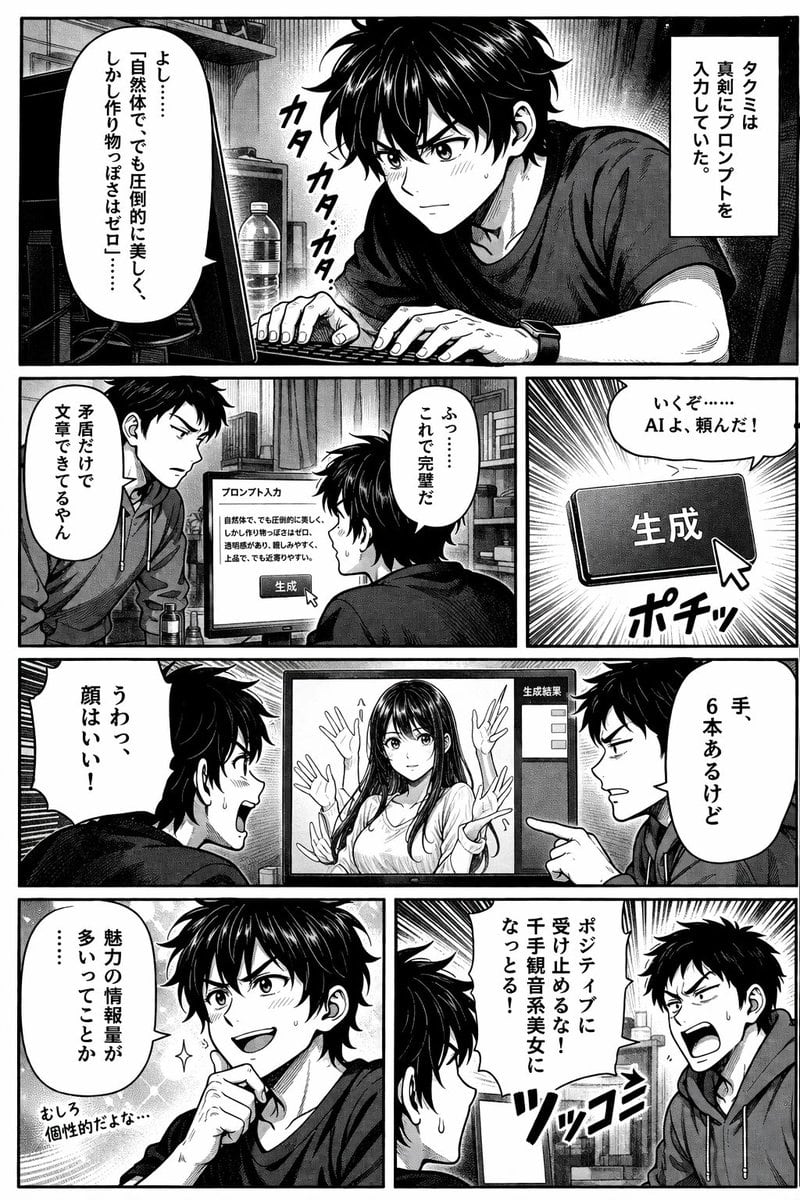
Ready-to-edit manga page image prompt.
Prompt

{ "type": "manga page", "style": "black and white, screentones, left-to-right reading", "characters": [ { "name": "Takumi", "appearance": "messy dark hair, t-shirt" }, { "name": "Friend", "appearance": "short dark hair, hoodie" } ], "layout": { "rows": 4, "panels": [ { "position": "row 1, full width", "scene": "Takumi typing at computer.", "text": [ "{argument name=\"takumi prompt text\" default=\"よし……「自然体で、でも圧倒的に美しく、しかし作り物っぽさはゼロ」……\"}", "タクミは真剣にプロンプトを入力していた。", "カタカタカタ" ] }, { "position": "row 2, left", "scene": "Friend looking at monitor.", "text": [ "{argument name=\"friend critique text\" default=\"矛盾だけで文章できてるやん\"}" ] }, { "position": "row 2, right", "scene": "Cursor clicking generate button.", "text": [ "生成", "ふっ……これで完璧だ", "いくぞ……AIよ、頼んだ!", "ポチッ" ] }, { "position": "row 3, full width", "scene": "Characters reacting to AI girl with 6 hands on monitor.", "text": [ "{argument name=\"takumi praise text\" default=\"うわっ、顔はいい!\"}", "{argument name=\"friend observation text\" default=\"手、6本あるけど\"}", "生成結果" ] }, { "position": "row 4, left", "scene": "Takumi looking satisfied.", "text": [ "魅力の情報量が多いってことか……", "むしろ個性的だよな…" ] }, { "position": "row 4, right", "scene": "Friend yelling angrily.", "text": [ "{argument name=\"friend yell text\" default=\"ポジティブに受け止めるな!千手観音系美女になっとる!\"}", "ツッコミ" ] } ] } }

Prompt structure
  • Modelgpt-image-2
  • Use casesocial-media-post
  • Styleanime, editorial
  • Aspect ratioFlexible
Best used for
  • Use casesocial-media-post
  • Styleanime, editorial
  • Recommended specs1:1, 4:5, 16:9, or 9:16
  • ModelGPT Image 2
How to customize

Use this Manga Page prompt as a base. Replace the subject, product details, environment, lighting, brand colors, and output ratio while keeping the social-media-post intent and anime, editorial direction stable.

Editable variables
  • SubjectReplace the product, person, scene, interface, or object being generated.
  • Use caseKeep or rewrite the destination as social media post, ad creative, cover image, poster, or ecommerce hero.
  • FrameChoose 1:1, 4:5, 16:9, or 9:16 based on the final placement.
  • Brand cuesAdd colors, materials, props, text-safe space, and the platform where the image will be used.
Recommended specs

Choose the frame for the destination first, then use 1K, 2K, or 4K based on output quality needs. Product images and posters usually benefit from higher resolution.

Pre-generation checklist
  • CheckSubject, lighting, composition, and frame are specific enough to review.
  • CheckText-safe space is included when the image will carry a headline or ad copy.
  • CheckResolution, credit cost, and final destination are checked before generation.
Why this prompt works

Manga Page works because it starts from the image job, then controls subject, composition, lighting, style, and frame. It is best for social media post while keeping the anime, editorial direction stable.

Common questions
  • Can I use it directly?Yes. Replace the subject, brand cues, and frame, then generate in Image2Studio.
  • Which ratio should I use?Choose 1:1, 4:5, 16:9, or 9:16 based on the destination.




