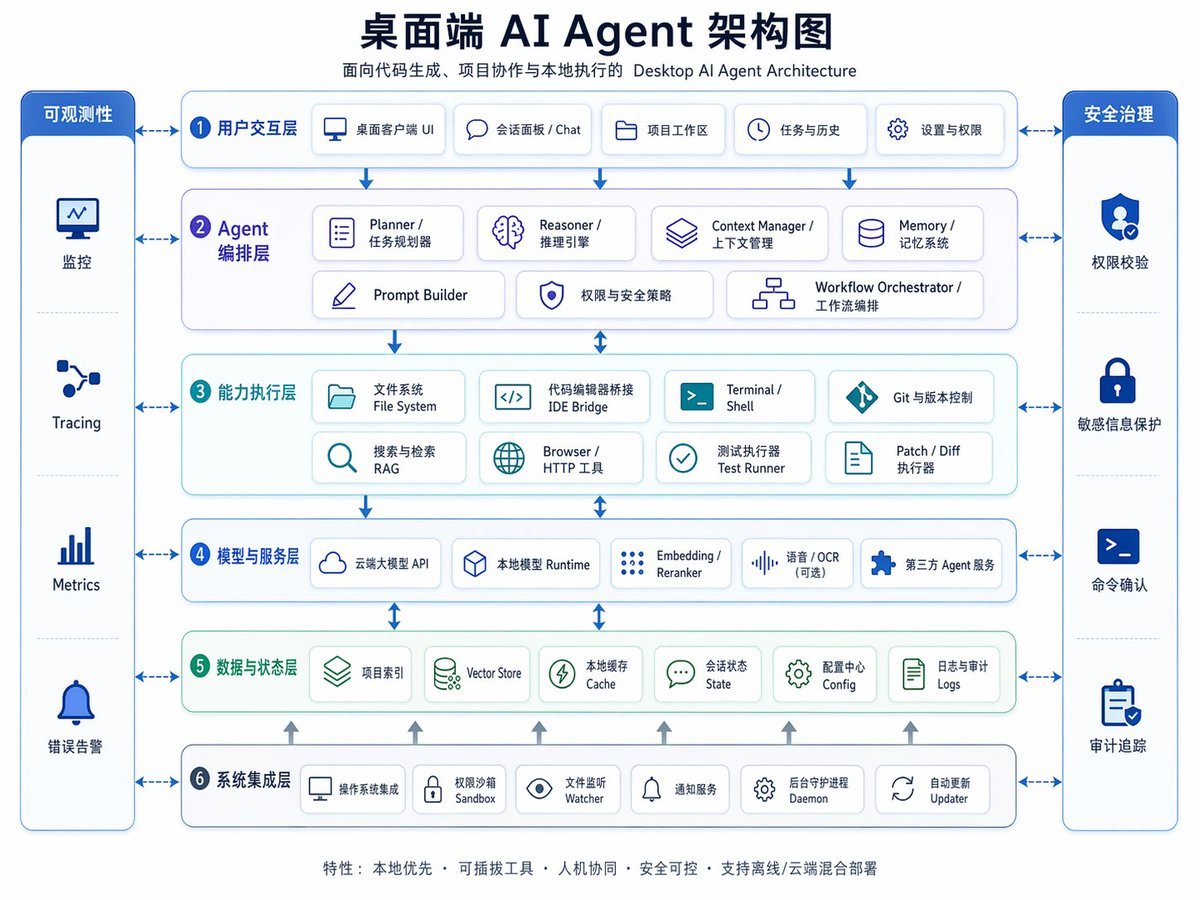
Prompt{"type":"bilingual enterprise architecture infographic","topic":"{argument name=\"headline text\" default=\"桌面端 AI Agent 架构图\"}","subtitle":"面向代码生成、项目协作与本地执行的 Desktop AI Agent Architecture","style":{"look":"clean modern SaaS diagram, corporate presentation slide, vector infographic","background":"very light gray-white","palette":{"primary":"deep navy blue","secondary":"medium blue","accent":"teal green","support":"soft gray","security":"bright royal blue"},"typography":"bold Chinese headline with smaller bilingual labels, crisp sans-serif, high legibility","icons":"minimal line icons inside rounded white cards with subtle shadows and blue outlines","geometry":"symmetrical grid, rounded rectangles, thin connector arrows, evenly spaced modules"},"layout":{"orientation":"landscape 4:3 presentation slide","header":{"title_centered":true,"title_size":"large","subtitle_below":true},"sections":[{"title":"可观测性","position":"far left vertical sidebar","count":4,"labels":["监控","Tracing","Metrics","错误告警"],"container":"tall rounded blue panel with four stacked cells and icons"},{"title":"安全治理","position":"far right vertical sidebar","count":4,"labels":["权限校验","敏感信息保护","命令确认","审计追踪"],"container":"tall rounded blue panel with four stacked cells and icons"},{"title":"1 用户交互层","position":"top horizontal layer","count":5,"labels":["桌面客户端 UI","会话面板 / Chat","项目工作区","任务与历史","设置与权限"],"container":"wide rounded white panel with blue border"},{"title":"2 Agent 编排层","position":"second horizontal layer","count":7,"labels":["Planner / 任务规划器","Reasoner / 推理引擎","Context Manager / 上下文管理","Memory / 记忆系统","Prompt Builder","权限与安全策略","Workflow Orchestrator / 工作流编排"],"container":"wide rounded white panel with faint purple-blue tint"},{"title":"3 能力执行层","position":"third horizontal layer","count":8,"labels":["文件系统 File System","代码编辑器桥接 IDE Bridge","Terminal / Shell","Git 与版本控制","搜索与检索 RAG","Browser / HTTP 工具","测试执行器 Test Runner","Patch / Diff 执行器"],"container":"wide rounded white panel with faint teal tint"},{"title":"4 模型与服务层","position":"fourth horizontal layer","count":5,"labels":["云端大模型 API","本地模型 Runtime","Embedding / Reranker","语音 / OCR(可选)","第三方 Agent 服务"],"container":"wide rounded white panel with blue border"},{"title":"5 数据与状态层","position":"fifth horizontal layer","count":6,"labels":["项目索引","Vector Store","本地缓存 Cache","会话状态 State","配置中心 Config","日志与审计 Logs"],"container":"wide rounded white panel with faint green tint"},{"title":"6 系统集成层","position":"bottom horizontal layer","count":6,"labels":["操作系统集成","权限沙箱 Sandbox","文件监听 Watcher","通知服务","后台守护进程 Daemon","自动更新 Updater"],"container":"wide rounded white panel with blue border"}],"centerpiece":"six stacked architecture layers in the middle with side governance columns","connectors":"dashed double-headed arrows connect each central layer to both sidebars; vertical blue arrows flow downward between central layers; small upward gray arrows rise from the bottom integration layer into the data layer","footer":{"count":1,"text":"特性: 本地优先 · 可插拔工具 · 人机协同 · 安全可控 · 支持离线/云端混合部署","position":"bottom center"}},"rendering":{"flat_vector":true,"high_resolution":true,"sharp_lines":true,"balanced_whitespace":true,"professional_pitch_deck_quality":true}}