
Image2Studio
Examples

gpt-image-2

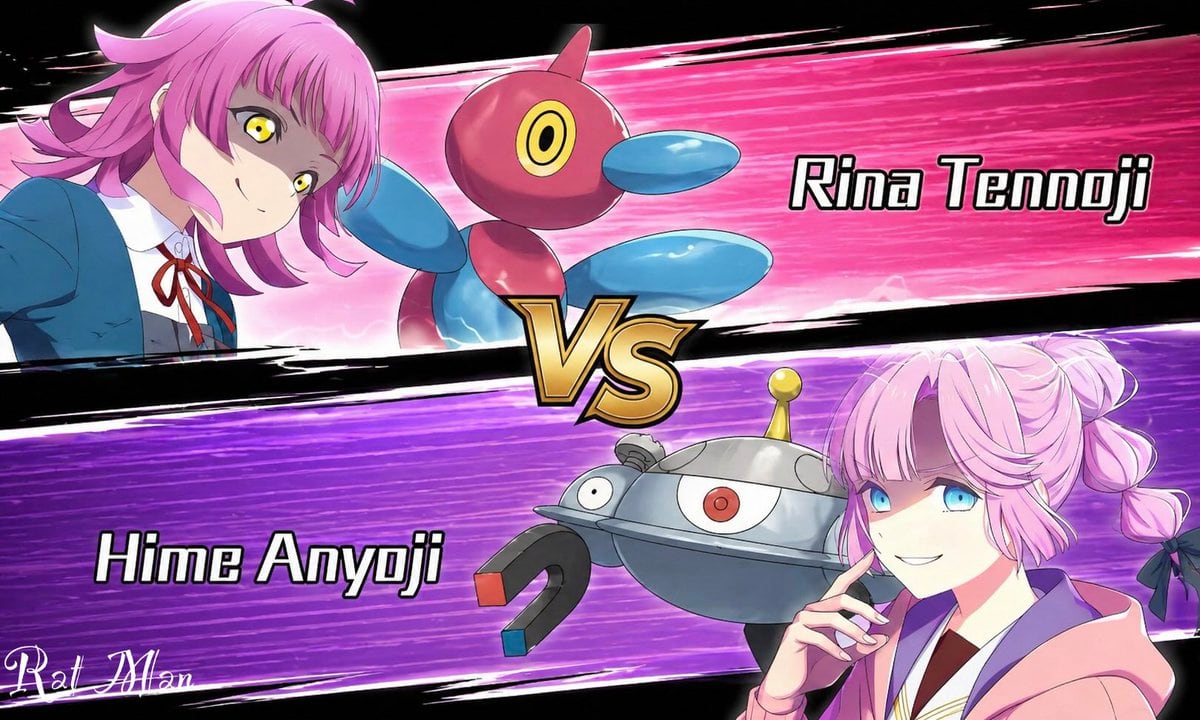
Anime Pokémon-Style Versus Screen

This prompt generates a bold anime battle-introduction splash image with two rival girls, their monster partners, and a dramatic VS layout for matchup art or social media posts.

This prompt generates a bold anime battle-introduction splash image with two rival girls, their monster partners, and a dramatic VS layout for matchup art or social media posts.
Prompt

A dynamic anime versus screen styled like a Pokémon battle intro, split diagonally into 2 opposing horizontal panels with a large metallic gold “VS” emblem in the center. The top panel has a hot pink speed-line background with black brushstroke borders and shows {argument name="top character name" default="Rina Tennoji"} on the left, a teenage anime girl in a blue school uniform jacket, white shirt, and red ribbon tie, leaning in from the left with a confident expression, short layered pink hair with outward flips, and vivid yellow eyes. Beside her is 1 floating Porygon2-like creature, glossy red and blue with a rounded body, oval blue limbs, and a single circular yellow-and-black eye. On the right side of the top panel, large bold white text with a black outline reads “Rina Tennoji.” The bottom panel has a vivid purple speed-line background with black brushstroke borders and shows {argument name="bottom character name" default="Hime Anyoji"} on the right, a teenage anime girl in a soft pink hoodie over a school-style outfit, posed with one hand near her chin, pastel pink hair in twin braided buns tied with dark bows. Her face is obscured by a large solid censor block rectangle. Beside her is 1 floating Magnezone-like robot creature, metallic silver and blue-gray with a domed body, 1 central red eye, 1 smaller side eye, a yellow antenna on top, and 2 horseshoe magnets as arms with red and blue tips. On the left side of the bottom panel, large bold white text with a black outline reads “Hime Anyoji.” Use crisp anime line art, glossy cel shading, dramatic motion streaks, high contrast, and a competitive game splash-screen composition on a black outer background. Include 2 characters, 2 creature companions, 2 name labels, 1 central VS emblem, and a small stylized white artist signature in the lower-left corner.

Prompt structure
  • Modelgpt-image-2
  • Use casesocial-media-post
  • Styleanime, cinematic, editorial, luxury
  • Aspect ratioFlexible
Best used for
  • Use casesocial-media-post
  • Styleanime, cinematic, editorial, luxury
  • Recommended specs1:1, 4:5, 16:9, or 9:16
  • ModelGPT Image 2
How to customize

Use this Anime Pokémon-Style Versus Screen prompt as a base. Replace the subject, product details, environment, lighting, brand colors, and output ratio while keeping the social-media-post intent and anime, cinematic, editorial, luxury direction stable.

Editable variables
  • SubjectReplace the product, person, scene, interface, or object being generated.
  • Use caseKeep or rewrite the destination as social media post, ad creative, cover image, poster, or ecommerce hero.
  • FrameChoose 1:1, 4:5, 16:9, or 9:16 based on the final placement.
  • Brand cuesAdd colors, materials, props, text-safe space, and the platform where the image will be used.
Recommended specs

Choose the frame for the destination first, then use 1K, 2K, or 4K based on output quality needs. Product images and posters usually benefit from higher resolution.

Pre-generation checklist
  • CheckSubject, lighting, composition, and frame are specific enough to review.
  • CheckText-safe space is included when the image will carry a headline or ad copy.
  • CheckResolution, credit cost, and final destination are checked before generation.
Why this prompt works

Anime Pokémon-Style Versus Screen works because it starts from the image job, then controls subject, composition, lighting, style, and frame. It is best for social media post while keeping the anime, cinematic, editorial, luxury direction stable.

Common questions
  • Can I use it directly?Yes. Replace the subject, brand cues, and frame, then generate in Image2Studio.
  • Which ratio should I use?Choose 1:1, 4:5, 16:9, or 9:16 based on the destination.




