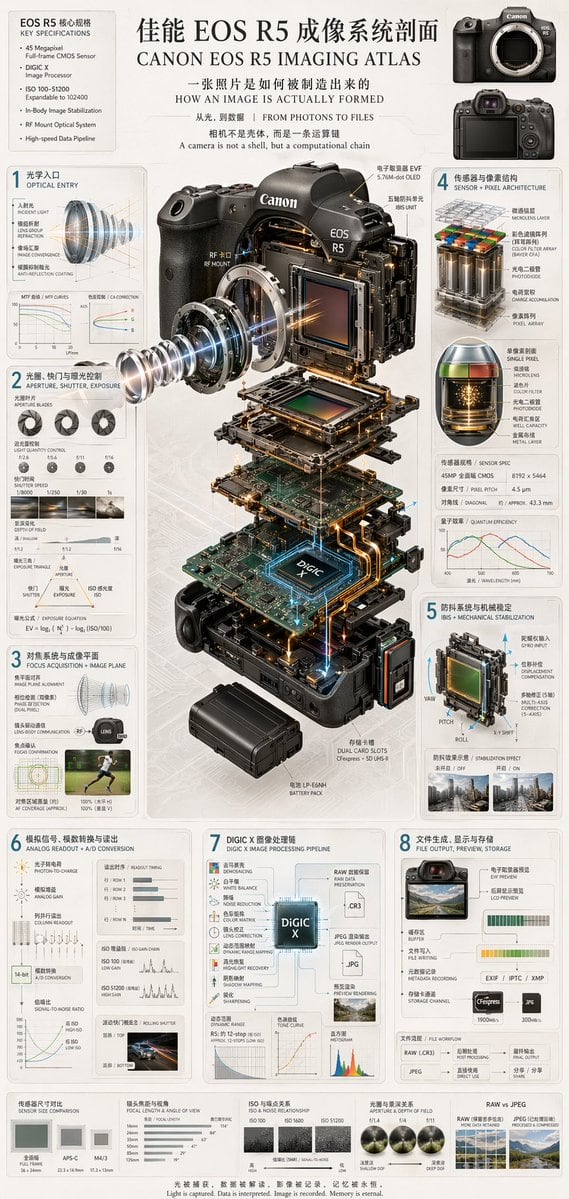
Prompt{
"type": "technical infographic and exploded view diagram",
"header": {
"title": "{argument name=\"main title\" default=\"佳能 EOS R5 成像系统剖面 CANON EOS R5 IMAGING ATLAS\"}",
"subtitles": [
"一张照片是如何被制造出来的 HOW AN IMAGE IS ACTUALLY FORMED",
"从光,到数据 | FROM PHOTONS TO FILES",
"相机不是壳体,而是一条运算链 A camera is not a shell, but a computational chain"
],
"top_left_box": {
"title": "EOS R5 核心规格 KEY SPECIFICATIONS",
"bullet_points_count": 6
},
"top_right_images": {
"count": 2,
"description": "front and back views of the camera body"
}
},
"centerpiece": {
"description": "highly detailed 3D exploded view of the {argument name=\"camera model\" default=\"Canon EOS R5\"} camera, showing internal components separated vertically",
"components_visible": [
"lens mount",
"lens elements with glowing blue light rays",
"image sensor",
"motherboard with glowing {argument name=\"processor name\" default=\"DIGIC X\"} chip",
"battery pack",
"dual card slots",
"electronic viewfinder (EVF)"
]
},
"layout": {
"numbered_sections": [
{
"number": 1,
"title": "光学入口 OPTICAL ENTRY",
"elements": ["lens cross-section with light rays", "2 line graphs"]
},
{
"number": 2,
"title": "光圈、快门与曝光控制 APERTURE, SHUTTER, EXPOSURE",
"elements": ["3 aperture blade diagrams", "4 shutter speed example photos", "depth of field diagram", "exposure triangle diagram"]
},
{
"number": 3,
"title": "对焦系统与成像平面 FOCUS ACQUISITION + IMAGE PLANE",
"elements": ["lens alignment diagram", "AF coverage photo of a runner"]
},
{
"number": 4,
"title": "传感器与像素结构 SENSOR + PIXEL ARCHITECTURE",
"elements": ["3D pixel array diagram", "single pixel cross-section diagram", "sensor spec table", "quantum efficiency graph"]
},
{
"number": 5,
"title": "防抖系统与机械稳定 IBIS + MECHANICAL STABILIZATION",
"elements": ["sensor shift mechanism diagram with yaw/pitch/roll axes", "2 stabilization effect comparison photos"]
},
{
"number": 6,
"title": "模拟信号、模数转换与读出 ANALOG READOUT + A/D CONVERSION",
"elements": ["signal flowchart", "3 readout timing graphs", "signal-to-noise ratio graph", "rolling shutter example photo of a car"]
},
{
"number": 7,
"title": "DIGIC X 图像处理链 DIGIC X IMAGE PROCESSING PIPELINE",
"elements": ["processing flowchart with central chip", "dynamic range graph", "tone curve graph", "histogram"]
},
{
"number": 8,
"title": "文件生成、显示与存储 FILE OUTPUT, PREVIEW, STORAGE",
"elements": ["file output flowchart", "2 storage card icons", "file workflow diagram"]
}
],
"bottom_comparisons": {
"count": 5,
"labels": [
"传感器尺寸对比 SENSOR SIZE COMPARISON",
"镜头焦距与视角 FOCAL LENGTH & ANGLE OF VIEW",
"ISO 与噪点关系 ISO & NOISE RELATIONSHIP",
"光圈与景深关系 APERTURE & DEPTH OF FIELD",
"RAW vs JPEG"
]
},
"footer": "{argument name=\"footer quote\" default=\"光被捕获,数据被解读,影像被记录,记忆被永恒。 Light is captured. Data is interpreted. Image is recorded. Memory is eternal.\"}"
},
"style": "clean, technical, highly detailed, photorealistic components, blueprint-style annotations, light gray background, precise typography"
}
How to customizeUse this Camera Exploded View Infographic prompt as a base. Replace the subject, product details, environment, lighting, brand colors, and output ratio while keeping the social-media-post intent and photorealistic, 3d-render, editorial, minimal direction stable.
Why this prompt worksCamera Exploded View Infographic works because it starts from the image job, then controls subject, composition, lighting, style, and frame. It is best for social media post while keeping the photorealistic, 3d-render, editorial, minimal direction stable.