
Image2Studio
Examples

gpt-image-2

Using REFERENCE_0 As The Visual Foundation

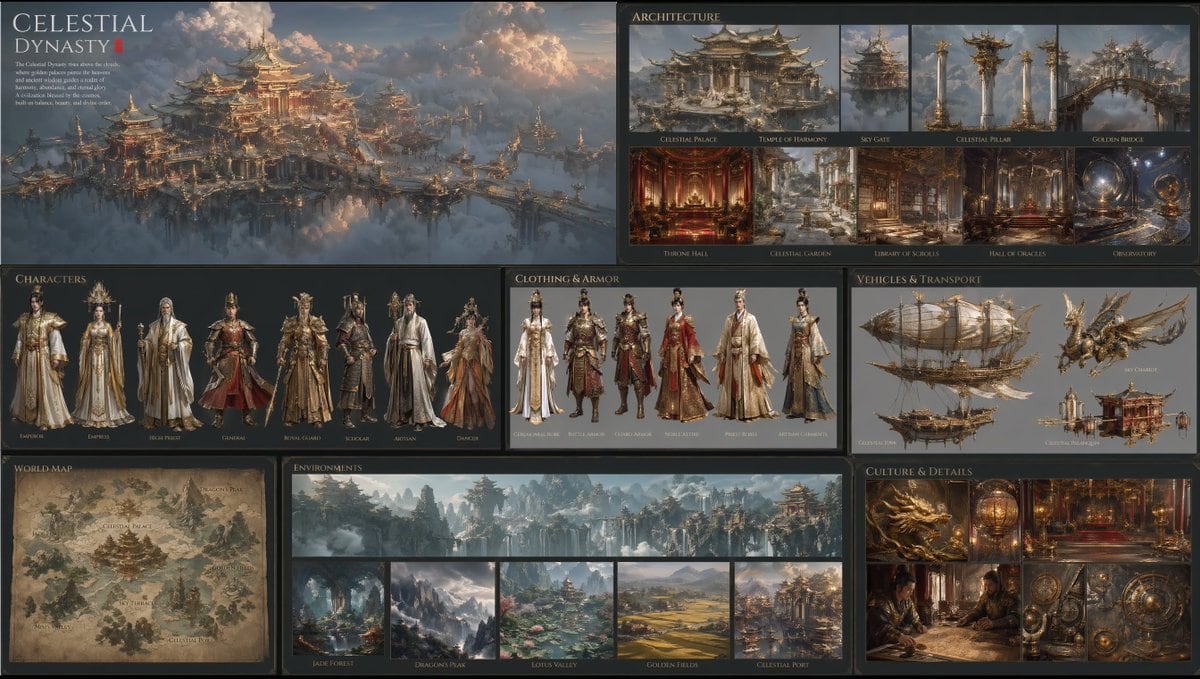
Using REFERENCE_0 as the visual foundation, expand the single sky-palace scene into a complete cinematic world-building presentation for a fantasy civilization. Preserve the same East Asi...

Using REFERENCE_0 as the visual foundation, expand the single sky-palace scene into a complete cinematic world-building presentation for a fantasy civilization. Preserve the same East Asi...
Prompt

Using REFERENCE_0 as the visual foundation, expand the single sky-palace scene into a complete cinematic world-building presentation for a fantasy civilization. Preserve the same East Asian celestial imperial design language, floating architecture above clouds, gilded ornamentation, warm sunset lighting, and ultra-detailed realistic concept-art look, then turn it into a polished multi-panel lore board on a dark background with elegant editorial typography. Include 8 labeled sections: 1 large hero overview panel for the civilization, 1 architecture section with 9 images, 1 characters section with 7 full-body character designs, 1 clothing and armor section with 6 outfit variations, 1 vehicles and transport section with 4 vehicle designs, 1 world map section with 1 illustrated map, 1 environments section with 6 environment images, and 1 culture and details section with 6 close-up detail images. Add a refined fantasy title and short lore paragraph for the civilization, using the name {argument name="civilization name" default="Celestial Dynasty"}. The architecture section should show 9 distinct items: palace, temple, gate, pillar, bridge, throne hall, garden, library, and observatory. The characters section should show 7 archetypes: emperor, empress, high priest, general, royal guard, scholar, and artisan. The clothing and armor section should show 6 designs: ceremonial robe, battle armor, noble attire, priest robes, artisan garments, and dancer costume. The vehicles and transport section should show 4 designs: an airship, a flying beast mount, a sky chariot, and a ceremonial palanquin. The environments section should show 6 scenes: one wide banner panorama plus 5 smaller locations, including forest, mountain peaks, lotus valley, golden fields, and a celestial port. The culture and details section should show 6 images: dragon motif, lantern or artifact, palace interior, scholarly scene, mechanical instruments, and decorative symbols. Keep all panels visually unified as if from one official franchise world bible, with extremely rich detail, believable material design, and cinematic realism.

Prompt structure
  • Modelgpt-image-2
  • Use casesocial-media-post
  • Stylecinematic, photorealistic, editorial, luxury
  • Aspect ratioFlexible
Best used for
  • Use casesocial-media-post
  • Stylecinematic, photorealistic, editorial, luxury
  • Recommended specs1:1, 4:5, 16:9, or 9:16
  • ModelGPT Image 2
How to customize

Use this Using REFERENCE_0 As The Visual Foundation prompt as a base. Replace the subject, product details, environment, lighting, brand colors, and output ratio while keeping the social-media-post intent and cinematic, photorealistic, editorial, luxury direction stable.

Editable variables
  • SubjectReplace the product, person, scene, interface, or object being generated.
  • Use caseKeep or rewrite the destination as social media post, ad creative, cover image, poster, or ecommerce hero.
  • FrameChoose 1:1, 4:5, 16:9, or 9:16 based on the final placement.
  • Brand cuesAdd colors, materials, props, text-safe space, and the platform where the image will be used.
Recommended specs

Choose the frame for the destination first, then use 1K, 2K, or 4K based on output quality needs. Product images and posters usually benefit from higher resolution.

Pre-generation checklist
  • CheckSubject, lighting, composition, and frame are specific enough to review.
  • CheckText-safe space is included when the image will carry a headline or ad copy.
  • CheckResolution, credit cost, and final destination are checked before generation.
Why this prompt works

Using REFERENCE_0 As The Visual Foundation works because it starts from the image job, then controls subject, composition, lighting, style, and frame. It is best for social media post while keeping the cinematic, photorealistic, editorial, luxury direction stable.

Common questions
  • Can I use it directly?Yes. Replace the subject, brand cues, and frame, then generate in Image2Studio.
  • Which ratio should I use?Choose 1:1, 4:5, 16:9, or 9:16 based on the destination.




