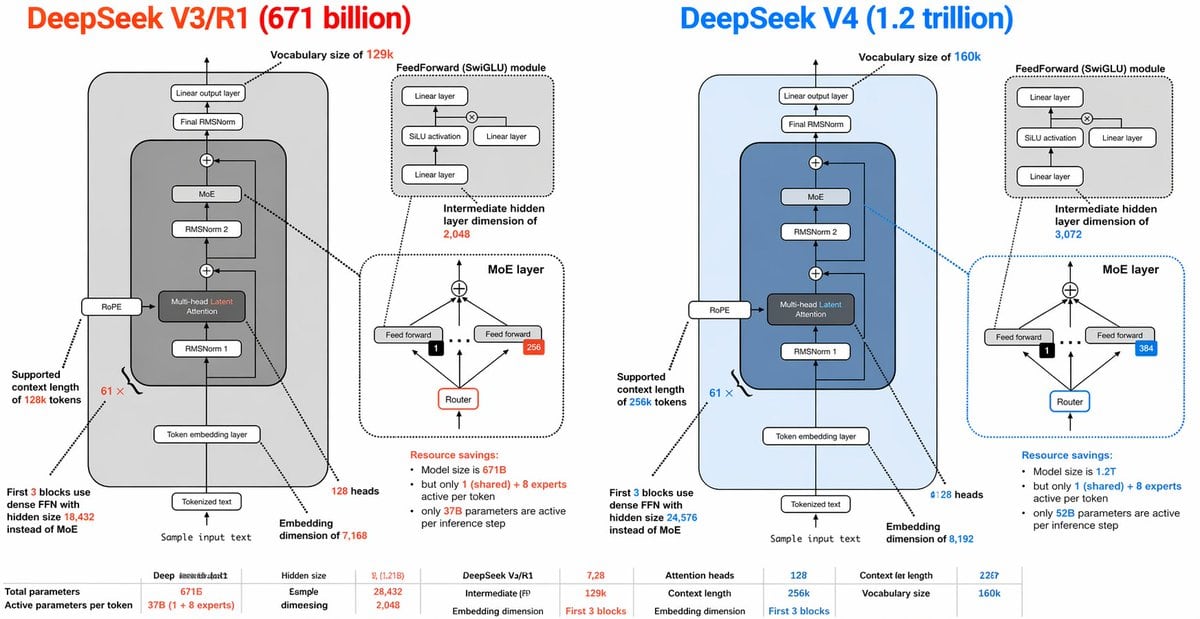
Prompt{"type":"side-by-side AI architecture comparison infographic","style":"clean technical diagram, white background, thin black outlines, rounded rectangles, dashed callout boxes, color-coded highlights, presentation-slide aesthetic, vector infographic","canvas":{"aspect_ratio":"2:1","resolution":"wide horizontal"},"title_row":{"left_title":"DeepSeek V3/R1 (671 billion)","right_title":"DeepSeek V4 (1.2 trillion)","left_title_color":"bright orange-red","right_title_color":"bright blue"},"layout":{"columns":2,"sections":[{"title":"DeepSeek V3/R1 (671 billion)","position":"left half","count":9,"labels":["Vocabulary size of 129k","FeedForward (SwiGLU) module","Intermediate hidden layer dimension of 2,048","MoE layer","Supported context length of 128k tokens","First 3 blocks use dense FFN with hidden size 18,432 instead of MoE","Sample input text","Embedding dimension of 7,168","128 heads"]},{"title":"DeepSeek V4 (1.2 trillion)","position":"right half","count":9,"labels":["Vocabulary size of 160k","FeedForward (SwiGLU) module","Intermediate hidden layer dimension of 3,072","MoE layer","Supported context length of 256k tokens","First 3 blocks use dense FFN with hidden size 24,576 instead of MoE","Sample input text","Embedding dimension of 8,192","128 heads"]},{"title":"bottom comparison table","position":"bottom full width","count":10,"labels":["Total parameters","Active parameters per token","Hidden size","Esmple dimesiegn","DeepSeek V3/R1","Intermediate (FF)","Attention heads","Context length","Embedding dimension","Vocabulary size"]}]},"left_panel":{"background":"very light gray rounded rectangle","main_stack":{"count":8,"blocks":["Tokenized text","Token embedding layer","RMSNorm 1","Multi-head Latent Attention","RMSNorm 2","MoE","Final RMSNorm","Linear output layer"]},"side_module":"RoPE attached to the attention block on the left side","attention_block":{"label":"Multi-head Latent Attention","accent":"orange-red text for the word Latent"},"feedforward_inset":{"title":"FeedForward (SwiGLU) module","count":4,"blocks":["Linear layer","SiLU activation","Linear layer","Linear layer"],"diagram":"two branches multiplied, then projected"},"moe_inset":{"title":"MoE layer","count":5,"blocks":["top combine node","Feed forward","Feed forward","Router","expert count badge 256"],"details":"small black square with 1 selected expert, arrows routing upward to experts, dotted divider line"},"annotations":{"vocab":"Vocabulary size of 129k","ff_dim":"Intermediate hidden layer dimension of 2,048","context":"Supported context length of 128k tokens","dense_first_blocks":"First 3 blocks use dense FFN with hidden size 18,432 instead of MoE","resource_savings":"Resource savings: Model size is 671B but only 1 (shared) + 8 experts active per token; only 37B parameters are active per inference step"},"bottom_stats":{"count":10,"items":["Total parameters: 671B","Active parameters per token: 37B (1 + 8 experts)","Hidden size: 7,128","Esmple dimesiegn: 28,432","Intermediate (FF): 2,048","Attention heads: 128","Context length: 128k","Embedding dimension: First 3 blocks","Context ler length: 22G7","Vocabulary size: 129k"]}},"right_panel":{"background":"very light blue rounded rectangle","main_stack":{"count":8,"blocks":["Tokenized text","Token embedding layer","RMSNorm 1","Multi-head Latent Attention","RMSNorm 2","MoE","Final RMSNorm","Linear output layer"]},"side_module":"RoPE attached to the attention block on the left side","attention_block":{"label":"Multi-head Latent Attention","accent":"blue text for the word Latent"},"feedforward_inset":{"title":"FeedForward (SwiGLU) module","count":4,"blocks":["Linear layer","SiLU activation","Linear layer","Linear layer"],"diagram":"same structure as left panel"},"moe_inset":{"title":"MoE layer","count":5,"blocks":["top combine node","Feed forward","Feed forward","Router","expert count badge 384"],"details":"small black square with 1 selected expert, arrows routing upward to experts, dotted divider line, blue border emphasis"},"annotations":{"vocab":"Vocabulary size of 160k","ff_dim":"Intermediate hidden layer dimension of 3,072","context":"Supported context length of 256k tokens","dense_first_blocks":"First 3 blocks use dense FFN with hidden size 24,576 instead of MoE","resource_savings":"Resource savings: Model size is 1.2T but only 1 (shared) + 8 experts active per token; only 52B parameters are active per inference step"},"bottom_stats":{"count":10,"items":["Total parameters: 1.2T","Active parameters per token: 52B (1 + 8 experts)","Hidden size: 7,2B","Esmple dimesiegn: 28,432","Intermediate (FF): 3,072","Attention heads: 128","Context length: 256k","Embedding dimension: First 3 blocks","Context ler length: 22G7","Vocabulary size: 160k"]}},"global_notes":"Create a highly detailed transformer architecture comparison diagram with mirrored layouts. Each half contains one large model stack diagram plus 2 inset diagrams: 1 feedforward module and 1 MoE layer. Use arrows between blocks, tiny technical labels, and connector lines from labels to the relevant components. Keep the typography dense and slide-like, with orange-red used for all V3/R1 emphasis and blue used for all V4 emphasis. Include a small bottom row of compact tabular metrics spanning the width. Preserve the slightly imperfect, human-made infographic look with very small text and crowded annotations."}