
Image2Studio
Examples

gpt-image-2

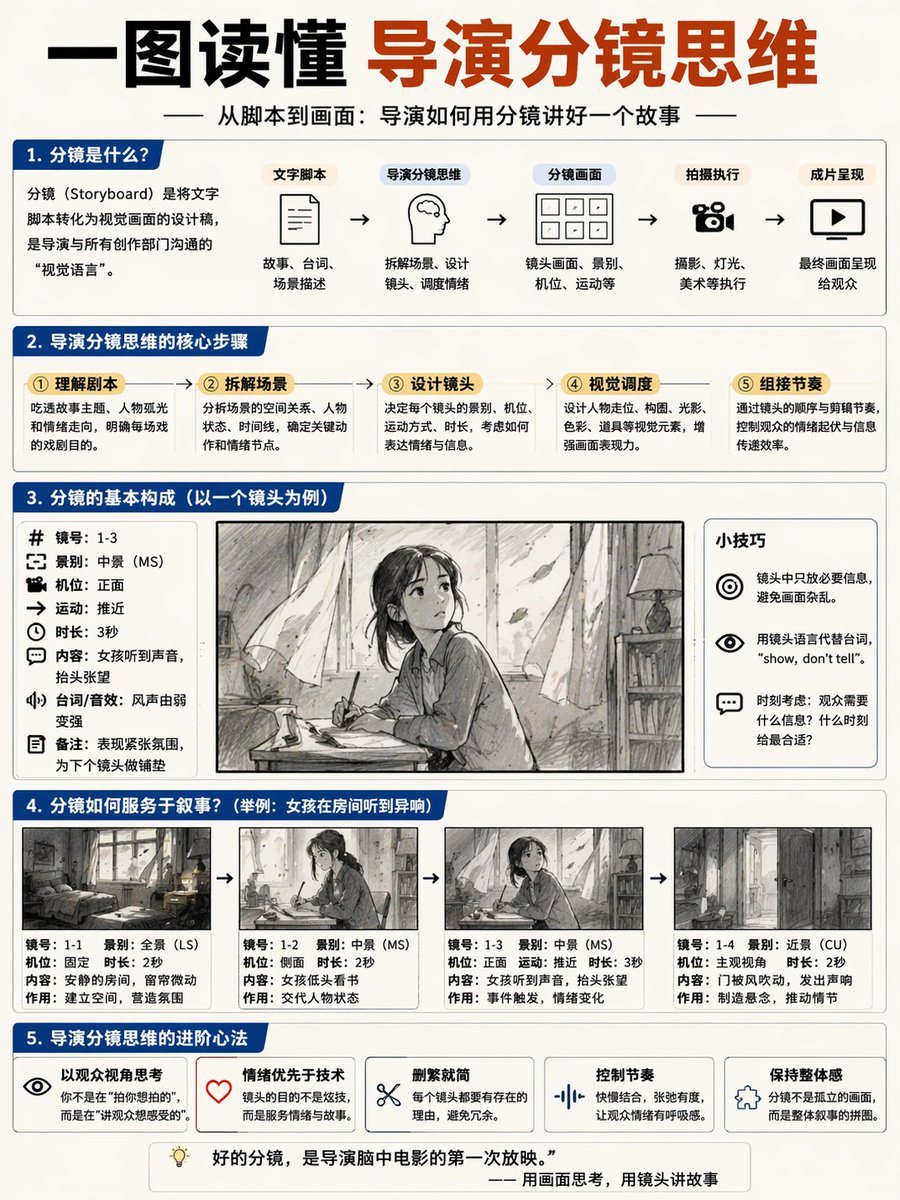
导演分镜思维信息图

生成一份关于分镜制作的 5 部分综合教育信息图,包含流程图、参数列表以及一个 4 帧连续漫画示例。

生成一份关于分镜制作的 5 部分综合教育信息图,包含流程图、参数列表以及一个 4 帧连续漫画示例。
Prompt

{ "type": "educational infographic poster", "header": { "title": "{argument name=\"main title\" default=\"一图读懂 导演分镜思维\"}", "subtitle": "{argument name=\"subtitle\" default=\"从脚本到画面:导演如何用分镜讲好一个故事\"}" }, "layout": { "sections": [ { "title": "1. 分镜是什么?", "components": [ "definition text box", { "type": "flowchart", "count": 5, "labels": ["文字脚本", "导演分镜思维", "分镜画面", "拍摄执行", "成片呈现"] } ] }, { "title": "2. 导演分镜思维的核心步骤", "count": 5, "labels": ["① 理解剧本", "② 拆解场景", "③ 设计镜头", "④ 视觉调度", "⑤ 组接节奏"] }, { "title": "3. 分镜的基本构成(以一个镜头为例)", "columns": [ { "position": "left", "count": 8, "labels": ["镜号", "景别", "机位", "运动", "时长", "内容", "台词/音效", "备注"] }, { "position": "center", "image": "{argument name=\"character subject\" default=\"anime girl reading in a room\"}" }, { "position": "right", "title": "小技巧", "count": 3, "description": "icon bullet points" } ] }, { "title": "4. 分镜如何服务于叙事?", "subtitle": "{argument name=\"example scenario\" default=\"举例:女孩在房间听到异响\"}", "count": 4, "panels": ["wide shot room", "medium shot girl reading", "medium shot girl looking up", "close up door opening"], "caption_labels": ["镜号", "景别", "机位", "时长", "内容", "作用"] }, { "title": "5. 导演分镜思维的进阶心法", "count": 5, "labels": ["以观众视角思考", "情绪优先于技术", "删繁就简", "控制节奏", "保持整体感"] } ], "footer": "{argument name=\"footer quote\" default=\"好的分镜,是导演脑中电影的第一次放映。\"}" }, "style": "clean corporate infographic, blue and white palette, structured grid" }

Prompt structure
  • Modelgpt-image-2
  • Use casesocial-media-post
  • Styleanime, editorial, minimal
  • Aspect ratioFlexible
Best used for
  • Use casesocial-media-post
  • Styleanime, editorial, minimal
  • Recommended specs1:1, 4:5, 16:9, or 9:16
  • ModelGPT Image 2
How to customize

Use this 导演分镜思维信息图 prompt as a base. Replace the subject, product details, environment, lighting, brand colors, and output ratio while keeping the social-media-post intent and anime, editorial, minimal direction stable.

Editable variables
  • SubjectReplace the product, person, scene, interface, or object being generated.
  • Use caseKeep or rewrite the destination as social media post, ad creative, cover image, poster, or ecommerce hero.
  • FrameChoose 1:1, 4:5, 16:9, or 9:16 based on the final placement.
  • Brand cuesAdd colors, materials, props, text-safe space, and the platform where the image will be used.
Recommended specs

Choose the frame for the destination first, then use 1K, 2K, or 4K based on output quality needs. Product images and posters usually benefit from higher resolution.

Pre-generation checklist
  • CheckSubject, lighting, composition, and frame are specific enough to review.
  • CheckText-safe space is included when the image will carry a headline or ad copy.
  • CheckResolution, credit cost, and final destination are checked before generation.
Why this prompt works

导演分镜思维信息图 works because it starts from the image job, then controls subject, composition, lighting, style, and frame. It is best for social media post while keeping the anime, editorial, minimal direction stable.

Common questions
  • Can I use it directly?Yes. Replace the subject, brand cues, and frame, then generate in Image2Studio.
  • Which ratio should I use?Choose 1:1, 4:5, 16:9, or 9:16 based on the destination.




