
Image2Studio
Examples

gpt-image-2

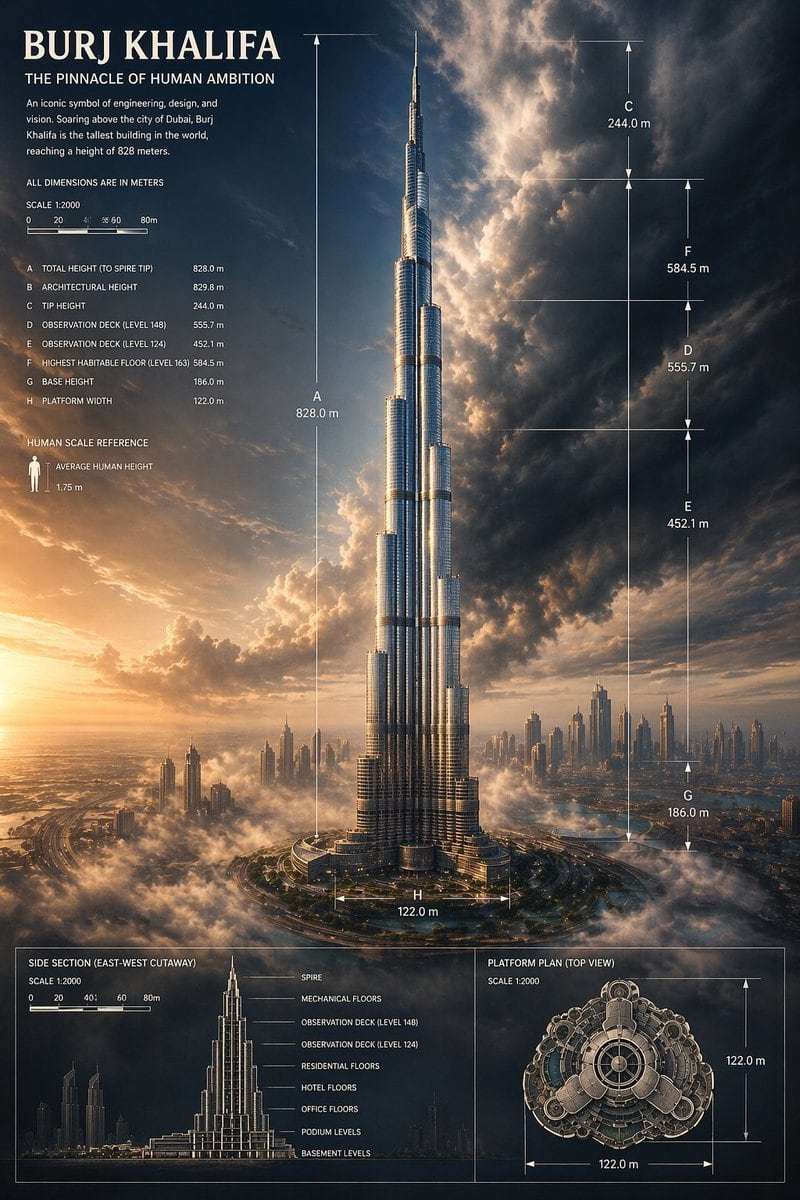
Architectural Infographic Poster

Ready-to-edit architectural infographic poster image prompt.

Ready-to-edit architectural infographic poster image prompt.
Prompt

{"type":"architectural infographic poster","subject":{"building":"Burj Khalifa","location":"Dubai","composition":"the tower centered and shown full height from base to spire, rising above low clouds and a distant modern skyline","perspective":"dramatic low-angle aerial city view","lighting":"golden sunset from the lower left with deep blue storm clouds and strong cinematic contrast","materials":"reflective silver glass and steel facade with crisp vertical highlights"},"style":{"genre":"premium engineering infographic mixed with epic architectural visualization","mood":"monumental, awe-inspiring, precise, luxurious","color_palette":["warm gold sunlight","deep navy sky","charcoal storm clouds","silver metal","soft white fog"]},"text":{"headline":"BURJ KHALIFA","subheadline":"THE PINNACLE OF HUMAN AMBITION","body":"An iconic symbol of engineering, design, and vision. Soaring above the city of Dubai, Burj Khalifa is the tallest building in the world, reaching a height of 828 meters.","note":"ALL DIMENSIONS ARE IN METERS","human_scale_label":"HUMAN SCALE REFERENCE","human_scale_text":"AVERAGE HUMAN HEIGHT 1.75 m"},"layout":{"sections":[{"title":"main elevation with dimensions","position":"full canvas center","count":8,"labels":["A TOTAL HEIGHT (TO SPIRE TIP) 828.0 m","B ARCHITECTURAL HEIGHT 829.8 m","C TIP HEIGHT 244.0 m","D OBSERVATION DECK (LEVEL 148) 555.7 m","E OBSERVATION DECK (LEVEL 124) 452.1 m","F HIGHEST HABITABLE FLOOR (LEVEL 163) 584.5 m","G BASE HEIGHT 186.0 m","H PLATFORM WIDTH 122.0 m"]},{"title":"side section (east-west cutaway)","position":"bottom left panel","count":8,"labels":["SPIRE","MECHANICAL FLOORS","OBSERVATION DECK (LEVEL 148)","OBSERVATION DECK (LEVEL 124)","RESIDENTIAL FLOORS","HOTEL FLOORS","OFFICE FLOORS","PODIUM LEVELS","BASEMENT LEVELS"]},{"title":"platform plan (top view)","position":"bottom right panel","count":2,"labels":["122.0 m horizontal","122.0 m vertical"]},{"title":"scale bars","position":"upper left and bottom panels","count":2,"labels":["SCALE 1:2000 main panel","SCALE 1:2000 bottom panels"]}],"graphic_elements":"thin white technical guide lines, arrows, dimension brackets, fine gridless drafting marks, small human icon for scale, narrow bordered panels at the bottom"},"scene":{"sky":"towering, turbulent clouds opening behind the spire with glowing sunlight breaking through","city":"Dubai skyline scattered across the horizon with smaller skyscrapers and haze","ground":"circular road system and landscaped podium around the base, partially covered by mist"},"rendering":{"detail":"ultra-detailed","finish":"polished magazine-cover quality","aspect_ratio":"2:3 vertical"}}

Prompt structure
  • Modelgpt-image-2
  • Use casesocial-media-post
  • Stylecinematic, editorial, luxury
  • Aspect ratioFlexible
Best used for
  • Use casesocial-media-post
  • Stylecinematic, editorial, luxury
  • Recommended specs1:1, 4:5, 16:9, or 9:16
  • ModelGPT Image 2
How to customize

Use this Architectural Infographic Poster prompt as a base. Replace the subject, product details, environment, lighting, brand colors, and output ratio while keeping the social-media-post intent and cinematic, editorial, luxury direction stable.

Editable variables
  • SubjectReplace the product, person, scene, interface, or object being generated.
  • Use caseKeep or rewrite the destination as social media post, ad creative, cover image, poster, or ecommerce hero.
  • FrameChoose 1:1, 4:5, 16:9, or 9:16 based on the final placement.
  • Brand cuesAdd colors, materials, props, text-safe space, and the platform where the image will be used.
Recommended specs

Choose the frame for the destination first, then use 1K, 2K, or 4K based on output quality needs. Product images and posters usually benefit from higher resolution.

Pre-generation checklist
  • CheckSubject, lighting, composition, and frame are specific enough to review.
  • CheckText-safe space is included when the image will carry a headline or ad copy.
  • CheckResolution, credit cost, and final destination are checked before generation.
Why this prompt works

Architectural Infographic Poster works because it starts from the image job, then controls subject, composition, lighting, style, and frame. It is best for social media post while keeping the cinematic, editorial, luxury direction stable.

Common questions
  • Can I use it directly?Yes. Replace the subject, brand cues, and frame, then generate in Image2Studio.
  • Which ratio should I use?Choose 1:1, 4:5, 16:9, or 9:16 based on the destination.




