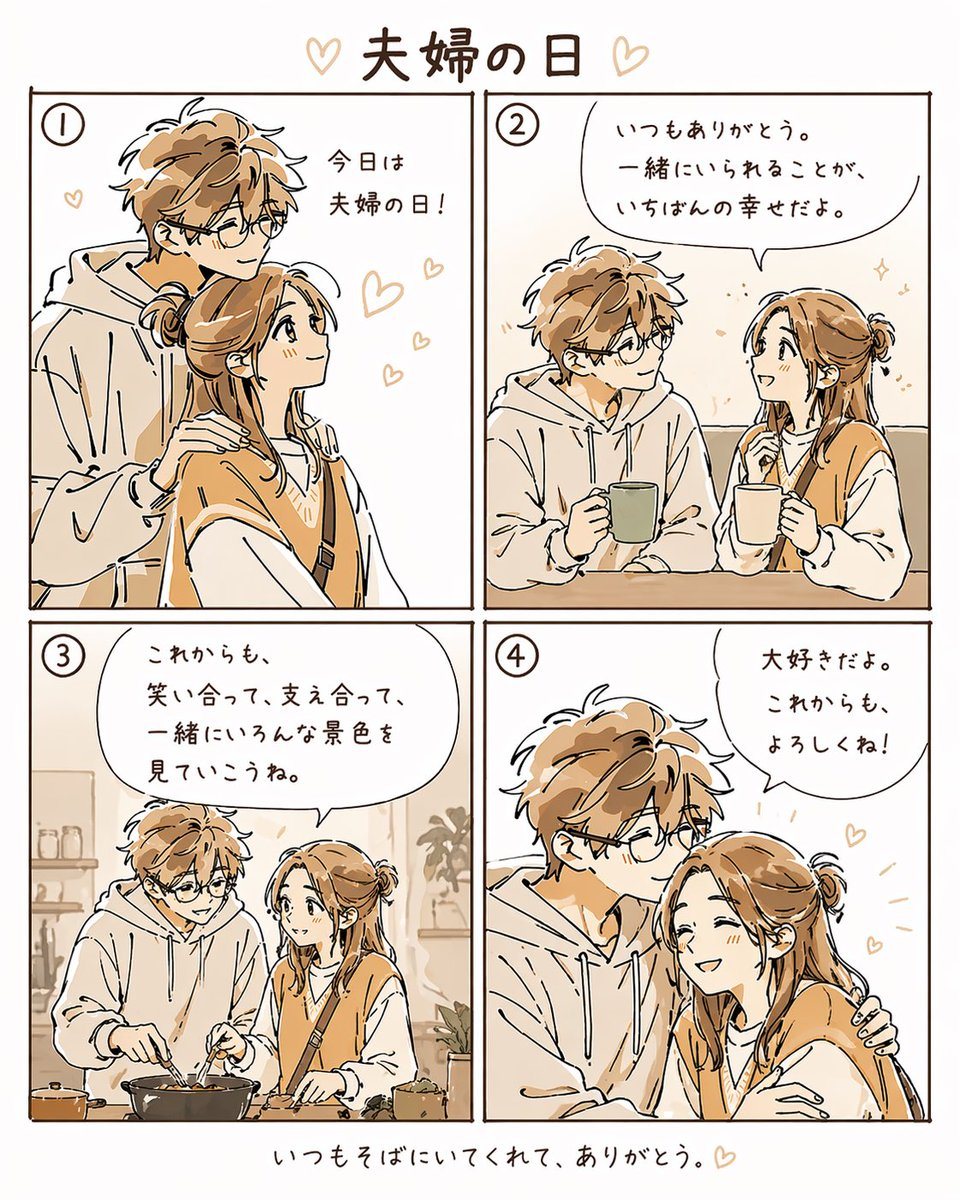
Prompt{"type":"4-panel romantic manga illustration","style":"clean hand-drawn anime line art with warm beige and soft brown limited palette, light cream background, cozy and gentle mood, minimal shading, sketch-like strokes, cute heart doodles","format":"square social media comic","title_text":"夫婦の日","bottom_caption":"いつもそばにいてくれて、ありがとう。","characters":{"count":2,"relationship":"married couple","male":{"appearance":"young adult man with messy light brown hair, round glasses, fair skin, oversized light hoodie, gentle expression, slightly tall and slim"},"female":{"appearance":"young adult woman with long light brown hair tied in a low loose bun, fair skin, white long-sleeve top under a warm brown sweater vest, crossbody strap visible, soft cheerful expression"}},"layout":{"grid":"2x2 panels with thin dark brown borders","sections":[{"title":"1","position":"top-left","count":1,"scene":"the couple standing close together, the man behind the woman with one hand resting on her shoulder, both looking upward affectionately","text":"今日は夫婦の日!","decorations":{"hearts":4}},{"title":"2","position":"top-right","count":1,"scene":"the couple sitting side by side indoors holding mugs and smiling at each other","text":"いつもありがとう。一緒にいられることが、いちばんの幸せだよ。","decorations":{"sparkles":2}},{"title":"3","position":"bottom-left","count":1,"scene":"the couple cooking together in a kitchen, stirring a pan on the stove, shelves and small plants in the background","text":"これからも、笑い合って、支え合って、一緒にいろんな景色を見ていこうね。","background_details_count":4,"background_details":["kitchen shelf","jars or cups","potted plant","countertop cookware"]},{"title":"4","position":"bottom-right","count":1,"scene":"close affectionate embrace, the man kissing the woman on the forehead while holding her shoulder, the woman leaning into him shyly","text":"大好きだよ。これからも、よろしくね!","decorations":{"hearts":3}}],"centerpiece":"a sweet day-in-the-life comic celebrating a married couple"},"composition":"balanced margins, large handwritten Japanese speech bubbles, circled panel numbers in the top-left of each panel, simple uncluttered backgrounds, warm romantic storytelling"}
Prompt structure- Modelgpt-image-2
- Use casesocial-media-post
- Styleminimal, anime, editorial, watercolor
- Aspect ratioFlexible
Best used for- Use casesocial-media-post
- Styleminimal, anime, editorial, watercolor
- Recommended specs1:1, 4:5, 16:9, or 9:16
- ModelGPT Image 2
How to customizeUse this 4-panel Romantic Manga Illustration prompt as a base. Replace the subject, product details, environment, lighting, brand colors, and output ratio while keeping the social-media-post intent and minimal, anime, editorial, watercolor direction stable.
Editable variables- SubjectReplace the product, person, scene, interface, or object being generated.
- Use caseKeep or rewrite the destination as social media post, ad creative, cover image, poster, or ecommerce hero.
- FrameChoose 1:1, 4:5, 16:9, or 9:16 based on the final placement.
- Brand cuesAdd colors, materials, props, text-safe space, and the platform where the image will be used.
Recommended specsChoose the frame for the destination first, then use 1K, 2K, or 4K based on output quality needs. Product images and posters usually benefit from higher resolution.
Pre-generation checklist- CheckSubject, lighting, composition, and frame are specific enough to review.
- CheckText-safe space is included when the image will carry a headline or ad copy.
- CheckResolution, credit cost, and final destination are checked before generation.
Why this prompt works4-panel Romantic Manga Illustration works because it starts from the image job, then controls subject, composition, lighting, style, and frame. It is best for social media post while keeping the minimal, anime, editorial, watercolor direction stable.
Common questions- Can I use it directly?Yes. Replace the subject, brand cues, and frame, then generate in Image2Studio.
- Which ratio should I use?Choose 1:1, 4:5, 16:9, or 9:16 based on the destination.