
Image2Studio
Examples

gpt-image-2

Japanese Infographic

Ready-to-edit Japanese infographic image prompt.

Ready-to-edit Japanese infographic image prompt.
Prompt

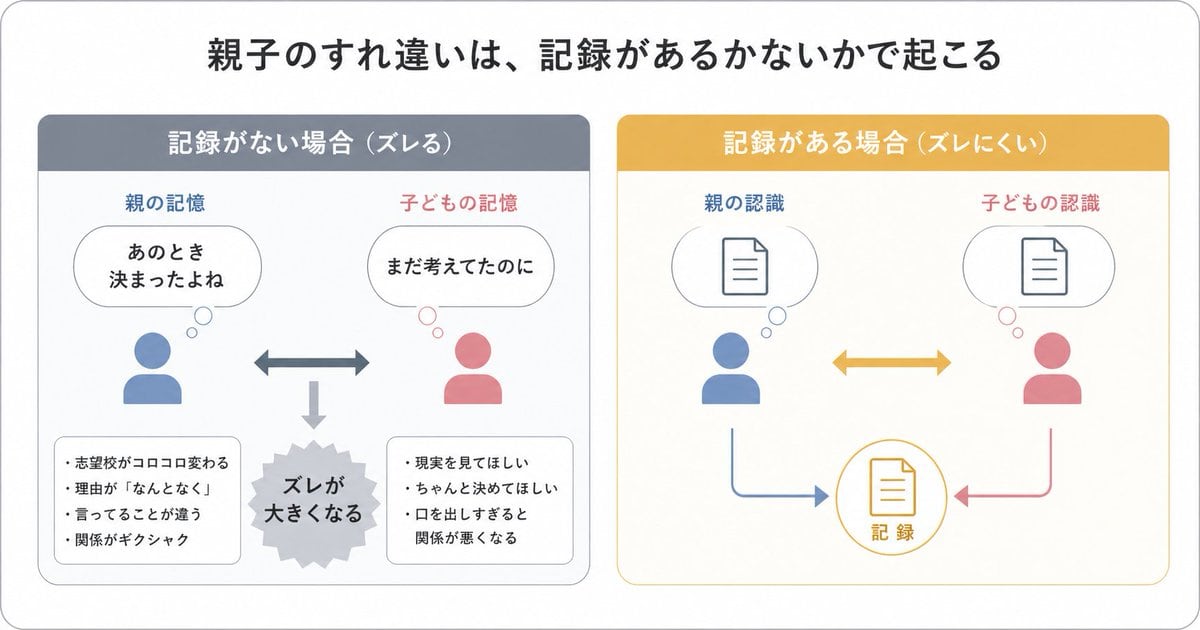
{"type":"Japanese infographic","style":"simple, easy-to-understand flat vector diagram, clean white background, rounded light-gray outer frame, minimal pastel color palette, presentation-slide design, clear hierarchy, lots of whitespace, modern sans-serif Japanese typography","canvas":{"aspect_ratio":"16:9"},"headline":{"text":"{argument name=\"headline text\" default=\"親子のすれ違いは、記録があるかないかで起こる\"}","position":"top center","size":"large bold black"},"layout":{"structure":"2 side-by-side rounded panels beneath the headline","sections":[{"title":"記録がない場合(ズレる)","position":"left","count":8,"header_color":"muted blue-gray","panel_border":"light gray","labels":["親の記憶","子どもの記憶","あのとき決まったよね","まだ考えてたのに","ズレが大きくなる","志望校がコロコロ変わる","理由が『なんとなく』","言ってることが違う","関係がギクシャク","現実を見てほしい","ちゃんと決めてほしい","口を出しすぎると関係が悪くなる"],"contents":{"top_left":{"type":"parent icon with thought bubble","icon_color":"blue","caption":"親の記憶","bubble_text":"あのとき\n決まったよね"},"top_right":{"type":"child icon with thought bubble","icon_color":"pink","caption":"子どもの記憶","bubble_text":"まだ考えてたのに"},"center":{"type":"horizontal double-headed arrow","color":"blue-gray"},"bottom_center":{"type":"downward arrow leading to burst shape","color":"light gray","burst_text":"ズレが\n大きくなる"},"bottom_left":{"type":"rounded note box","bullet_count":4,"bullets":["志望校がコロコロ変わる","理由が『なんとなく』","言ってることが違う","関係がギクシャク"]},"bottom_right":{"type":"rounded note box","bullet_count":3,"bullets":["現実を見てほしい","ちゃんと決めてほしい","口を出しすぎると関係が悪くなる"]}}},{"title":"記録がある場合(ズレにくい)","position":"right","count":7,"header_color":"mustard yellow","panel_border":"light yellow","labels":["親の認識","子どもの認識","記録"],"contents":{"top_left":{"type":"parent icon with thought bubble containing document symbol","icon_color":"blue","caption":"親の認識"},"top_right":{"type":"child icon with thought bubble containing document symbol","icon_color":"pink","caption":"子どもの認識"},"center":{"type":"horizontal double-headed arrow","color":"mustard yellow"},"bottom_center":{"type":"circular record icon with document symbol","outline_color":"mustard yellow","text":"記録"},"bottom_left_connector":{"type":"curved arrow from parent to record","color":"blue"},"bottom_right_connector":{"type":"curved arrow from child to record","color":"pink"}}}],"spacing":"balanced, symmetrical"},"visual_language":{"icons":"generic human bust icons and simple document line icons","emphasis":"contrast the left panel's misunderstanding with the right panel's shared record","mood":"educational, calm, practical"},"text_language":"Japanese","render_quality":"crisp vector edges, infographic suitable for social media educational posts"}

Prompt structure
  • Modelgpt-image-2
  • Use casesocial-media-post
  • Styleminimal, editorial
  • Aspect ratioFlexible
Best used for
  • Use casesocial-media-post
  • Styleminimal, editorial
  • Recommended specs1:1, 4:5, 16:9, or 9:16
  • ModelGPT Image 2
How to customize

Use this Japanese Infographic prompt as a base. Replace the subject, product details, environment, lighting, brand colors, and output ratio while keeping the social-media-post intent and minimal, editorial direction stable.

Editable variables
  • SubjectReplace the product, person, scene, interface, or object being generated.
  • Use caseKeep or rewrite the destination as social media post, ad creative, cover image, poster, or ecommerce hero.
  • FrameChoose 1:1, 4:5, 16:9, or 9:16 based on the final placement.
  • Brand cuesAdd colors, materials, props, text-safe space, and the platform where the image will be used.
Recommended specs

Choose the frame for the destination first, then use 1K, 2K, or 4K based on output quality needs. Product images and posters usually benefit from higher resolution.

Pre-generation checklist
  • CheckSubject, lighting, composition, and frame are specific enough to review.
  • CheckText-safe space is included when the image will carry a headline or ad copy.
  • CheckResolution, credit cost, and final destination are checked before generation.
Why this prompt works

Japanese Infographic works because it starts from the image job, then controls subject, composition, lighting, style, and frame. It is best for social media post while keeping the minimal, editorial direction stable.

Common questions
  • Can I use it directly?Yes. Replace the subject, brand cues, and frame, then generate in Image2Studio.
  • Which ratio should I use?Choose 1:1, 4:5, 16:9, or 9:16 based on the destination.




