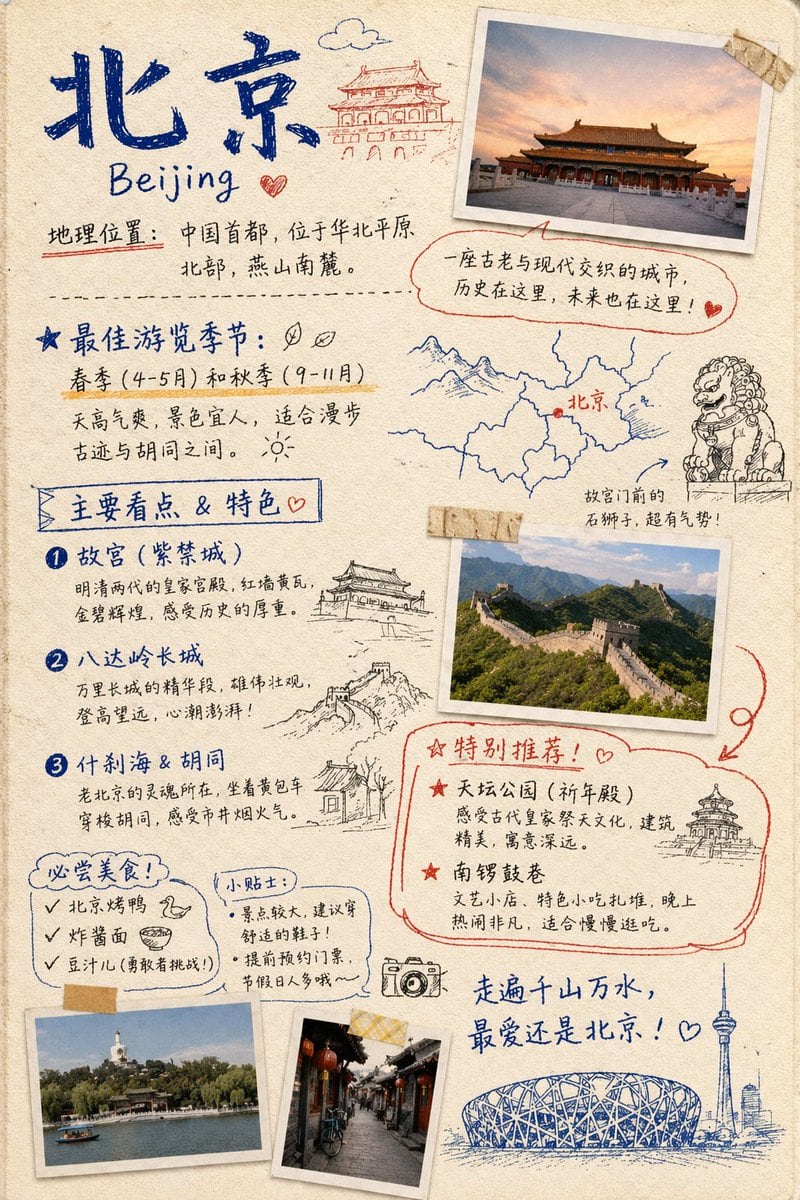
Prompt{ "type": "travel journal scrapbook page", "style": "hand-drawn bullet journal, textured beige paper background, blue and red ink handwriting, masking tape, polaroid-style photos, sketch doodles", "header": { "title": "{argument name=\"city name\" default=\"北京\"}", "subtitle": "{argument name=\"city name english\" default=\"Beijing\"}", "location_text": "地理位置:中国首都,位于华北平原北部,燕山南麓。", "doodle": "traditional Chinese gate building" }, "photos": { "count": 4, "descriptions": [ "Forbidden City at sunset with masking tape", "Great Wall of China landscape with masking tape", "Beihai Park with white stupa", "Traditional Hutong alleyway with red lanterns" ] }, "layout": { "sections": [ { "title": "最佳游览季节:", "position": "mid-left", "labels": [ "春季 (4-5月) 和秋季 (9-11月)" ], "doodles": [ "two leaves", "sun" ] }, { "title": "Map and Lion", "position": "mid-right", "labels": [ "北京", "故宫门前的石狮子,超有气势!" ], "doodles": [ "map with red dot", "stone guardian lion" ] }, { "title": "主要看点 & 特色", "position": "left-middle", "count": 3, "labels": [ "{argument name=\"main attraction 1\" default=\"故宫 (紫禁城)\"}", "{argument name=\"main attraction 2\" default=\"八达岭长城\"}", "什刹海 & 胡同" ], "doodles": [ "traditional pavilion", "Great Wall segment", "traditional house" ] }, { "title": "特别推荐!", "position": "bottom-right", "count": 2, "labels": [ "天坛公园 (祈年殿)", "南锣鼓巷" ], "doodles": [ "Temple of Heaven" ], "style": "outlined in red ink" }, { "title": "必尝美食!", "position": "bottom-left", "count": 3, "labels": [ "{argument name=\"must try food 1\" default=\"北京烤鸭\"}", "炸酱面", "豆汁儿 (勇敢者挑战!)" ], "doodles": [ "duck head", "bowl of noodles" ] }, { "title": "小贴士:", "position": "bottom-left-center", "count": 2, "labels": [ "景点较大,建议穿舒适的鞋子!", "提前预约门票,节假日人多哦~" ] } ], "footer": { "quote": "走遍千山万水,最爱还是北京!", "doodles": [ "camera", "Bird's Nest stadium", "CCTV tower skyline" ] } } }
Prompt structure- Modelgpt-image-2
- Use casesocial-media-post
- Stylephotorealistic, editorial
- Aspect ratioFlexible
Best used for- Use casesocial-media-post
- Stylephotorealistic, editorial
- Recommended specs1:1, 4:5, 16:9, or 9:16
- ModelGPT Image 2
How to customizeUse this Travel Journal Scrapbook Page prompt as a base. Replace the subject, product details, environment, lighting, brand colors, and output ratio while keeping the social-media-post intent and photorealistic, editorial direction stable.
Editable variables- SubjectReplace the product, person, scene, interface, or object being generated.
- Use caseKeep or rewrite the destination as social media post, ad creative, cover image, poster, or ecommerce hero.
- FrameChoose 1:1, 4:5, 16:9, or 9:16 based on the final placement.
- Brand cuesAdd colors, materials, props, text-safe space, and the platform where the image will be used.
Recommended specsChoose the frame for the destination first, then use 1K, 2K, or 4K based on output quality needs. Product images and posters usually benefit from higher resolution.
Pre-generation checklist- CheckSubject, lighting, composition, and frame are specific enough to review.
- CheckText-safe space is included when the image will carry a headline or ad copy.
- CheckResolution, credit cost, and final destination are checked before generation.
Why this prompt worksTravel Journal Scrapbook Page works because it starts from the image job, then controls subject, composition, lighting, style, and frame. It is best for social media post while keeping the photorealistic, editorial direction stable.
Common questions- Can I use it directly?Yes. Replace the subject, brand cues, and frame, then generate in Image2Studio.
- Which ratio should I use?Choose 1:1, 4:5, 16:9, or 9:16 based on the destination.