
Image2Studio
Examples

gpt-image-2

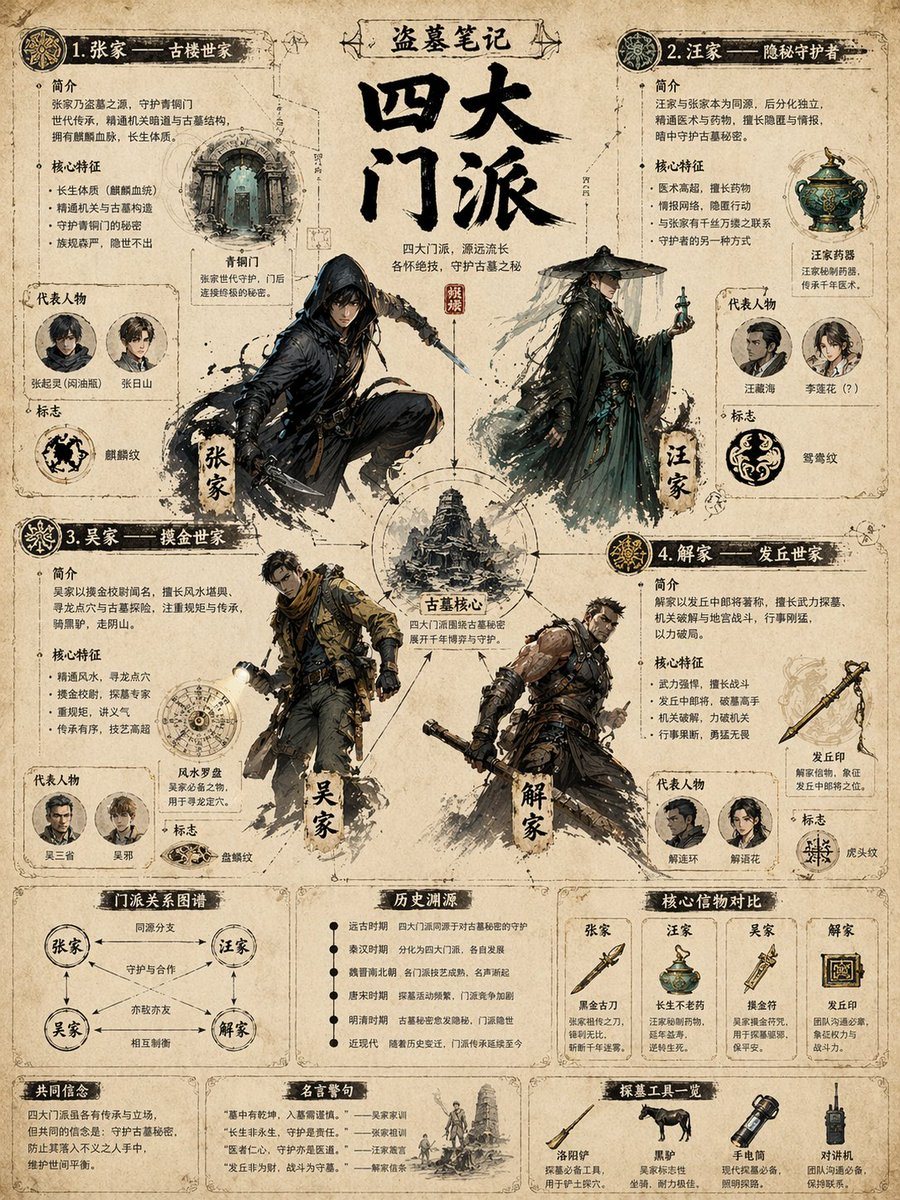
Highly Detailed Infographic Poster

Ready-to-edit highly detailed infographic poster image prompt.

Ready-to-edit highly detailed infographic poster image prompt.
Prompt

{ "type": "highly detailed infographic poster", "style": "{argument name=\"visual style\" default=\"vintage parchment paper, wuxia tomb-raiding theme, detailed ink and watercolor illustrations\"}", "header": { "franchise": "{argument name=\"franchise name\" default=\"盗墓笔记\"}", "title": "{argument name=\"main title\" default=\"四大门派\"}", "subtitle": "四大门派,源远流长 各怀绝技,守护古墓之秘" }, "centerpiece": { "title": "古墓核心", "description": "Circular diagram connecting the four factions around a central tower illustration." }, "factions": [ { "title": "1. 张家 —— 古楼世家", "character_illustration": "hooded swordsman in dynamic pose", "sections": ["简介", "核心特征", "代表人物", "标志"], "representatives_count": 2, "representatives_labels": ["张起灵(闷油瓶)", "张日山"], "symbol": "麒麟纹", "featured_item": "青铜门" }, { "title": "2. 汪家 —— 隐秘守护者", "character_illustration": "mysterious man in bamboo hat holding a glowing vial", "sections": ["简介", "核心特征", "代表人物", "标志"], "representatives_count": 2, "representatives_labels": ["汪藏海", "李莲花 (?)"], "symbol": "鸳鸯纹", "featured_item": "汪家药器" }, { "title": "3. 吴家 —— 摸金世家", "character_illustration": "modern explorer with flashlight and tactical gear", "sections": ["简介", "核心特征", "代表人物", "标志"], "representatives_count": 2, "representatives_labels": ["吴三省", "吴邪"], "symbol": "盘龙纹", "featured_item": "风水罗盘" }, { "title": "4. 解家 —— 发丘世家", "character_illustration": "muscular fighter with mechanical weapon", "sections": ["简介", "核心特征", "代表人物", "标志"], "representatives_count": 2, "representatives_labels": ["解连环", "解语花"], "symbol": "虎头纹", "featured_item": "发丘印" } ], "bottom_panels": [ { "title": "门派关系图谱", "type": "relationship diagram", "nodes_count": 4, "labels": ["同源分支", "守护与合作", "亦敌亦友", "相互制衡"] }, { "title": "历史渊源", "type": "timeline list", "entries_count": 6, "labels": ["远古时期", "秦汉时期", "魏晋南北朝", "唐宋时期", "明清时期", "近现代"] }, { "title": "核心信物对比", "type": "comparison table", "columns_count": 4, "items": ["黑金古刀", "长生不老药", "摸金符", "发丘印"] }, { "title": "共同信念", "type": "text block" }, { "title": "名言警句", "type": "quotes list", "quotes_count": 4 }, { "title": "探墓工具一览", "type": "item showcase", "items_count": 4, "labels": ["洛阳铲", "黑驴", "手电筒", "对讲机"] } ] }

Prompt structure
  • Modelgpt-image-2
  • Use casesocial-media-post
  • Stylewatercolor
  • Aspect ratioFlexible
Best used for
  • Use casesocial-media-post
  • Stylewatercolor
  • Recommended specs1:1, 4:5, 16:9, or 9:16
  • ModelGPT Image 2
How to customize

Use this Highly Detailed Infographic Poster prompt as a base. Replace the subject, product details, environment, lighting, brand colors, and output ratio while keeping the social-media-post intent and watercolor direction stable.

Editable variables
  • SubjectReplace the product, person, scene, interface, or object being generated.
  • Use caseKeep or rewrite the destination as social media post, ad creative, cover image, poster, or ecommerce hero.
  • FrameChoose 1:1, 4:5, 16:9, or 9:16 based on the final placement.
  • Brand cuesAdd colors, materials, props, text-safe space, and the platform where the image will be used.
Recommended specs

Choose the frame for the destination first, then use 1K, 2K, or 4K based on output quality needs. Product images and posters usually benefit from higher resolution.

Pre-generation checklist
  • CheckSubject, lighting, composition, and frame are specific enough to review.
  • CheckText-safe space is included when the image will carry a headline or ad copy.
  • CheckResolution, credit cost, and final destination are checked before generation.
Why this prompt works

Highly Detailed Infographic Poster works because it starts from the image job, then controls subject, composition, lighting, style, and frame. It is best for social media post while keeping the watercolor direction stable.

Common questions
  • Can I use it directly?Yes. Replace the subject, brand cues, and frame, then generate in Image2Studio.
  • Which ratio should I use?Choose 1:1, 4:5, 16:9, or 9:16 based on the destination.




