
Image2Studio
Examples

gpt-image-2

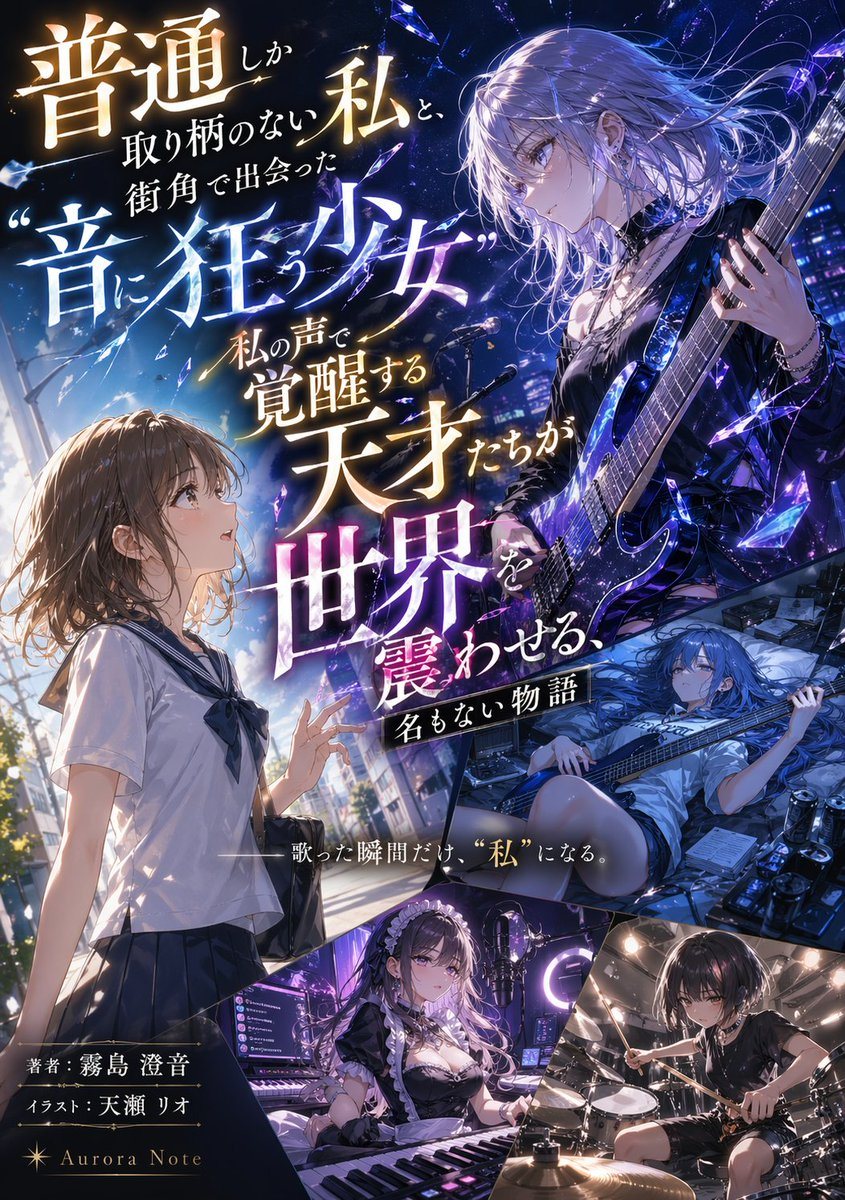
Light Novel Cover with Multi-Character Band Layout

Generates a complex light novel cover featuring a multi-panel layout of an all-girl music band and customizable Japanese typography.

Generates a complex light novel cover featuring a multi-panel layout of an all-girl music band and customizable Japanese typography.
Prompt

{ "type": "light novel cover illustration", "style": "anime art style, highly detailed, dramatic lighting, shattered glass motifs", "typography": { "title": "{argument name=\"main title\" default=\"普通しか取り柄のない私と、街角で出会った“音に狂う少女” 私の声で覚醒する天才たちが世界を震わせる、名もない物語\"}", "subtitle": "{argument name=\"catchphrase\" default=\"——歌った瞬間だけ、“私”になる。\"}", "credits": [ "著者:{argument name=\"author name\" default=\"霧島 澄音\"}", "イラスト:{argument name=\"illustrator name\" default=\"天瀬 リオ\"}", "{argument name=\"label name\" default=\"Aurora Note\"}" ] }, "layout": { "description": "diagonal and dynamic paneling separating 5 distinct character scenes", "panels": [ { "position": "left half", "character": "ordinary high school girl, brown bob hair, white and navy sailor uniform", "action": "looking up in awe, reaching out slightly", "background": "daytime city street, bright sunlight" }, { "position": "top right", "character": "rock girl, silver hair, black gothic outfit, choker", "action": "playing a glowing blue electric guitar", "background": "nighttime stage, shattered blue crystal effects" }, { "position": "middle right", "character": "bassist girl, long blue hair, casual t-shirt and shorts", "action": "lying down while playing a bass guitar", "background": "messy room, music equipment, effect pedals, energy drink cans" }, { "position": "bottom left", "character": "keyboardist girl, long dark hair, maid outfit", "action": "sitting at a synthesizer keyboard, streaming setup", "background": "neon purple lit room, monitors, ring light, microphone" }, { "position": "bottom right", "character": "drummer girl, short black hair, black t-shirt, choker", "action": "playing a drum set dynamically", "background": "dimly lit recording studio" } ] } }

Prompt structure
  • Modelgpt-image-2
  • Use casesocial-media-post
  • Styleeditorial, cinematic, anime, cyberpunk
  • Aspect ratioFlexible
Best used for
  • Use casesocial-media-post
  • Styleeditorial, cinematic, anime, cyberpunk
  • Recommended specs1:1, 4:5, 16:9, or 9:16
  • ModelGPT Image 2
How to customize

Use this Light Novel Cover with Multi-Character Band Layout prompt as a base. Replace the subject, product details, environment, lighting, brand colors, and output ratio while keeping the social-media-post intent and editorial, cinematic, anime, cyberpunk direction stable.

Editable variables
  • SubjectReplace the product, person, scene, interface, or object being generated.
  • Use caseKeep or rewrite the destination as social media post, ad creative, cover image, poster, or ecommerce hero.
  • FrameChoose 1:1, 4:5, 16:9, or 9:16 based on the final placement.
  • Brand cuesAdd colors, materials, props, text-safe space, and the platform where the image will be used.
Recommended specs

Choose the frame for the destination first, then use 1K, 2K, or 4K based on output quality needs. Product images and posters usually benefit from higher resolution.

Pre-generation checklist
  • CheckSubject, lighting, composition, and frame are specific enough to review.
  • CheckText-safe space is included when the image will carry a headline or ad copy.
  • CheckResolution, credit cost, and final destination are checked before generation.
Why this prompt works

Light Novel Cover with Multi-Character Band Layout works because it starts from the image job, then controls subject, composition, lighting, style, and frame. It is best for social media post while keeping the editorial, cinematic, anime, cyberpunk direction stable.

Common questions
  • Can I use it directly?Yes. Replace the subject, brand cues, and frame, then generate in Image2Studio.
  • Which ratio should I use?Choose 1:1, 4:5, 16:9, or 9:16 based on the destination.




