
Image2Studio
Examples

gpt-image-2

Using The Provided Reference Image

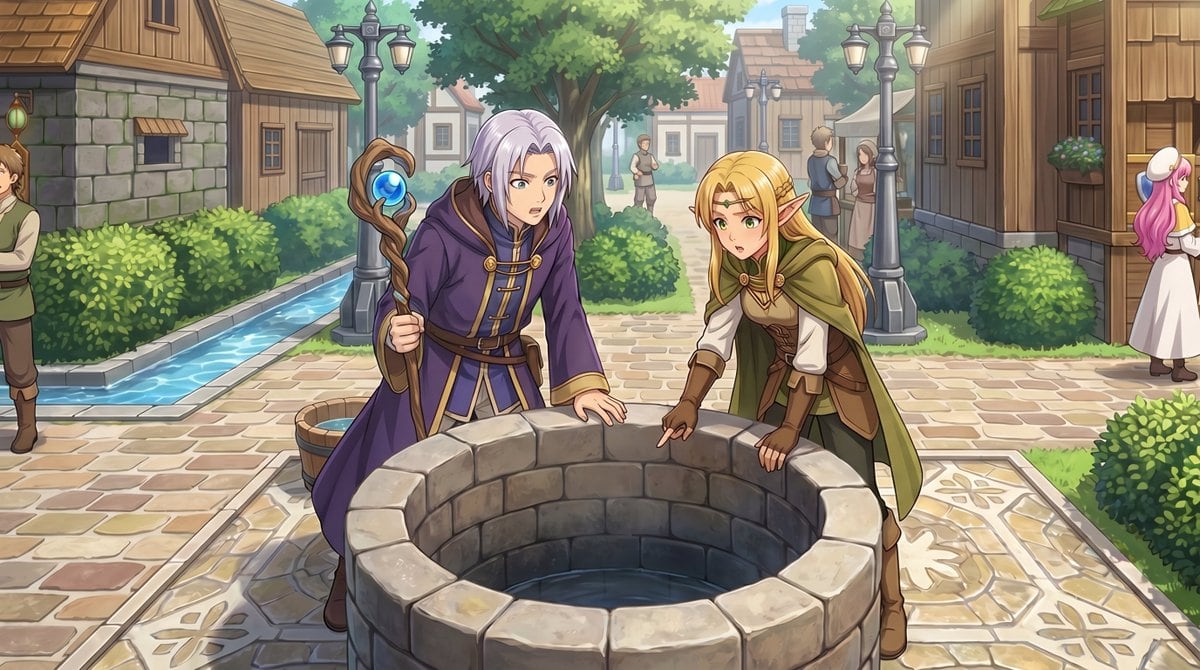
Using the provided reference image, transform the top-down RPG town map into a polished anime-style event illustration from a human eye-level perspective. Keep the same village location a...

Using the provided reference image, transform the top-down RPG town map into a polished anime-style event illustration from a human eye-level perspective. Keep the same village location a...
Prompt

Using the provided reference image, transform the top-down RPG town map into a polished anime-style event illustration from a human eye-level perspective. Keep the same village location and layout cues: the central stone well, the path network, the hedges, the wooden houses, and the narrow water canal on the left. Convert the 2 small sprite characters by the well into 2 full-size fantasy characters in the foreground: a silver-haired mage in a purple robe holding a staff, and a blonde elf in green-and-brown adventurer clothing, both leaning over and looking into the well. Add a cinematic JRPG feel with soft daylight, detailed painterly rendering, clean line art, and gentle depth of field. Preserve the sense that this scene is taking place in the same town square, but enrich it with natural perspective, more environmental detail, and 5 background villagers: 1 man cropped at the far left edge, 2 small figures standing on the center path in the distance, and 2 townspeople talking near the right-side buildings.

Prompt structure
  • Modelgpt-image-2
  • Use casesocial-media-post
  • Stylecinematic, anime, editorial, minimal
  • Aspect ratioFlexible
Best used for
  • Use casesocial-media-post
  • Stylecinematic, anime, editorial, minimal
  • Recommended specs1:1, 4:5, 16:9, or 9:16
  • ModelGPT Image 2
How to customize

Use this Using The Provided Reference Image prompt as a base. Replace the subject, product details, environment, lighting, brand colors, and output ratio while keeping the social-media-post intent and cinematic, anime, editorial, minimal direction stable.

Editable variables
  • SubjectReplace the product, person, scene, interface, or object being generated.
  • Use caseKeep or rewrite the destination as social media post, ad creative, cover image, poster, or ecommerce hero.
  • FrameChoose 1:1, 4:5, 16:9, or 9:16 based on the final placement.
  • Brand cuesAdd colors, materials, props, text-safe space, and the platform where the image will be used.
Recommended specs

Choose the frame for the destination first, then use 1K, 2K, or 4K based on output quality needs. Product images and posters usually benefit from higher resolution.

Pre-generation checklist
  • CheckSubject, lighting, composition, and frame are specific enough to review.
  • CheckText-safe space is included when the image will carry a headline or ad copy.
  • CheckResolution, credit cost, and final destination are checked before generation.
Why this prompt works

Using The Provided Reference Image works because it starts from the image job, then controls subject, composition, lighting, style, and frame. It is best for social media post while keeping the cinematic, anime, editorial, minimal direction stable.

Common questions
  • Can I use it directly?Yes. Replace the subject, brand cues, and frame, then generate in Image2Studio.
  • Which ratio should I use?Choose 1:1, 4:5, 16:9, or 9:16 based on the destination.




