
Image2Studio
Examples

gpt-image-2

Create A Clean

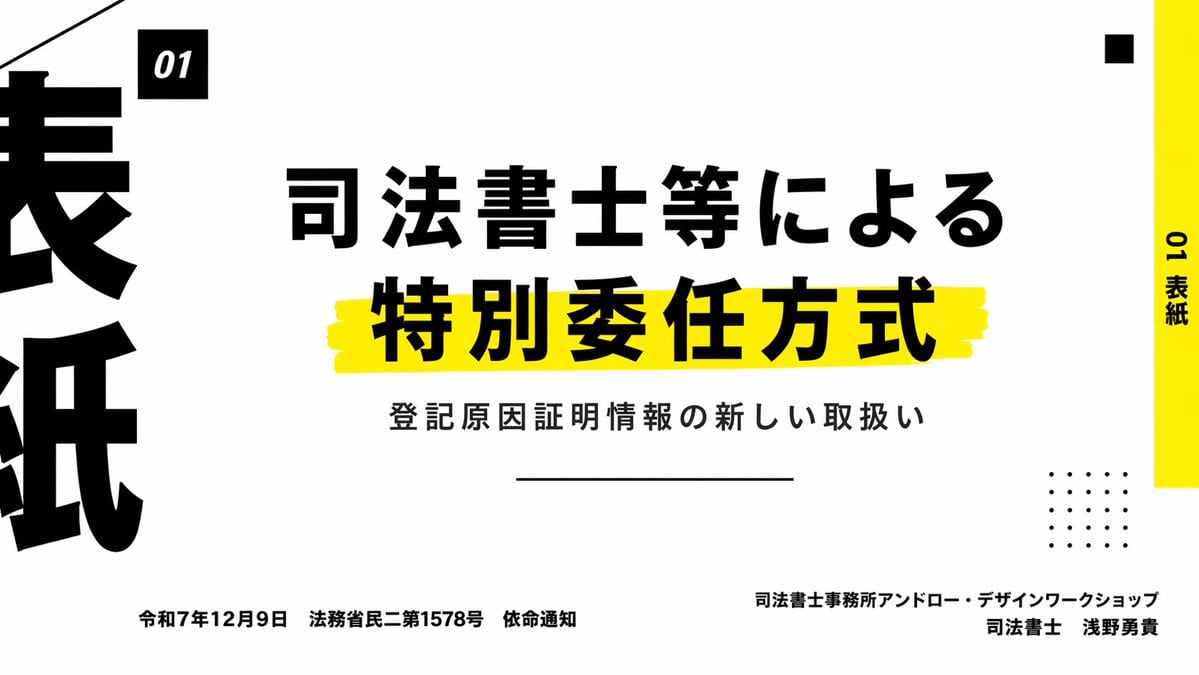
Create a clean, modern Japanese presentation cover slide in a minimalist editorial style, landscape 16:9. Use a very light gray background with bold black typography and vivid yellow acce...

Create a clean, modern Japanese presentation cover slide in a minimalist editorial style, landscape 16:9. Use a very light gray background with bold black typography and vivid yellow acce...
Prompt

Create a clean, modern Japanese presentation cover slide in a minimalist editorial style, landscape 16:9. Use a very light gray background with bold black typography and vivid yellow accent bars. The layout is asymmetrical and high contrast, with lots of negative space. Place a small black square near the upper left containing the white text "01" in italic bold sans serif. Across the center, set a large Japanese title in heavy black type on 2 lines: "司法書士等による" on the first line and "特別委任方式" on the second line, with the second line much larger and sitting on a rough hand-painted yellow highlight stroke. Below it, add a smaller Japanese subtitle in black: "登記原因証明情報の新しい取扱い". Under the subtitle, place a thin horizontal black line centered. Along the far right edge, add a tall vertical yellow sidebar with black vertical text reading "01 表紙". Near the top right, place 1 small black square as a decorative element. In the lower right quadrant, place a decorative 5 by 5 dotted grid made of 25 small black dots. On the far left edge, crop in oversized black Japanese characters so they are only partially visible, creating a strong graphic border effect. At the bottom left, place a single line of small black Japanese text: "令和7年12月9日 法務省民二第1578号 依命通知". At the bottom right, place 2 lines of small black Japanese text, right aligned: first line "司法書士事務所アンドロー・デザインワークショップ", second line "司法書士 浅野勇貴". Add a thin diagonal black line entering from the top left corner as another graphic accent. Overall feel: premium business presentation, legal seminar title slide, Swiss-inspired grid composition, bold Japanese typography, sharp and print-like.

Prompt structure
  • Modelgpt-image-2
  • Use casesocial-media-post
  • Styleminimal, editorial, watercolor, luxury
  • Aspect ratioFlexible
Best used for
  • Use casesocial-media-post
  • Styleminimal, editorial, watercolor, luxury
  • Recommended specs1:1, 4:5, 16:9, or 9:16
  • ModelGPT Image 2
How to customize

Use this Create A Clean prompt as a base. Replace the subject, product details, environment, lighting, brand colors, and output ratio while keeping the social-media-post intent and minimal, editorial, watercolor, luxury direction stable.

Editable variables
  • SubjectReplace the product, person, scene, interface, or object being generated.
  • Use caseKeep or rewrite the destination as social media post, ad creative, cover image, poster, or ecommerce hero.
  • FrameChoose 1:1, 4:5, 16:9, or 9:16 based on the final placement.
  • Brand cuesAdd colors, materials, props, text-safe space, and the platform where the image will be used.
Recommended specs

Choose the frame for the destination first, then use 1K, 2K, or 4K based on output quality needs. Product images and posters usually benefit from higher resolution.

Pre-generation checklist
  • CheckSubject, lighting, composition, and frame are specific enough to review.
  • CheckText-safe space is included when the image will carry a headline or ad copy.
  • CheckResolution, credit cost, and final destination are checked before generation.
Why this prompt works

Create A Clean works because it starts from the image job, then controls subject, composition, lighting, style, and frame. It is best for social media post while keeping the minimal, editorial, watercolor, luxury direction stable.

Common questions
  • Can I use it directly?Yes. Replace the subject, brand cues, and frame, then generate in Image2Studio.
  • Which ratio should I use?Choose 1:1, 4:5, 16:9, or 9:16 based on the destination.




