
Image2Studio
Examples

gpt-image-2

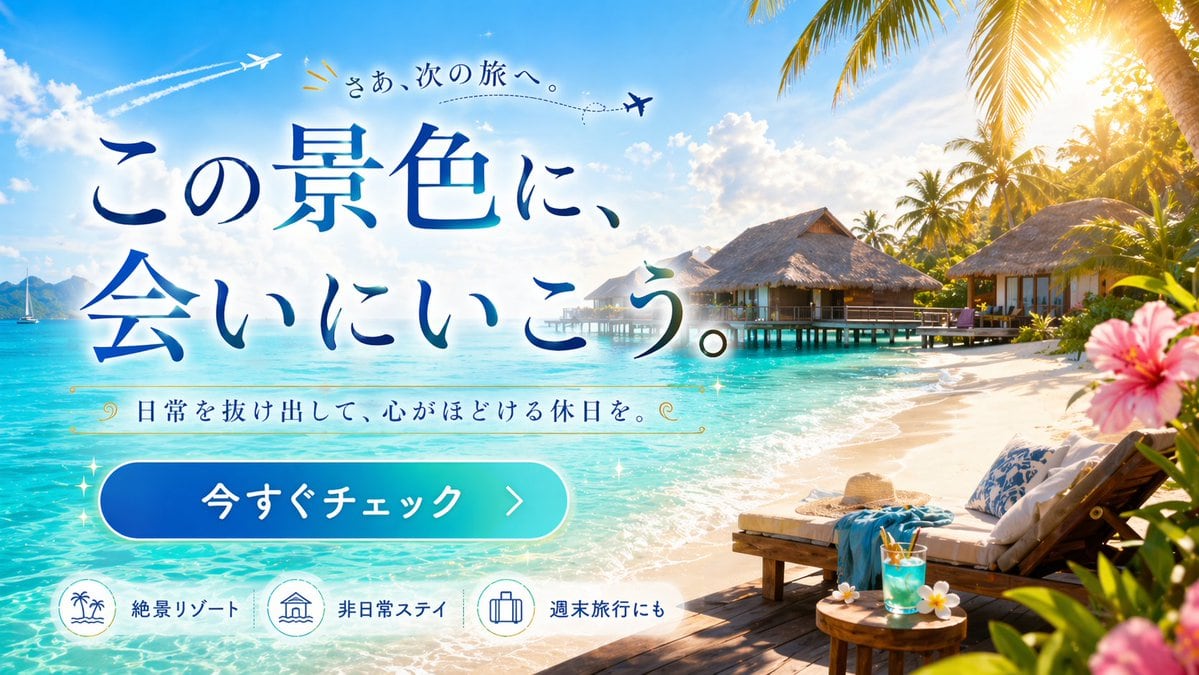
Tropical Resort Travel Ad Banner

Generates a vibrant travel advertisement banner featuring a tropical resort background, foreground lounge elements, and customizable promotional text overlays.

Generates a vibrant travel advertisement banner featuring a tropical resort background, foreground lounge elements, and customizable promotional text overlays.
Prompt

{ "type": "travel advertisement web banner", "scene": { "setting": "{argument name=\"destination type\" default=\"tropical overwater bungalow resort\"}", "background": "turquoise water, blue sky, fluffy clouds, palm trees, distant sailboat, 2 airplanes with dashed flight paths", "foreground_right": "wooden deck, 2 lounge chairs, white cushions, blue towel, straw hat, round table, blue tropical drink, frangipani, pink hibiscus framing edge" }, "layout": { "text_overlay": { "position": "center-left", "elements": [ { "type": "top_text", "text": "{argument name=\"top text\" default=\"さあ、次の旅へ。\"}", "decoration": "airplane icon, dashed line" }, { "type": "main_headline", "text": "{argument name=\"main headline\" default=\"この景色に、会いにいこう。\"}", "style": "large blue gradient serif font" }, { "type": "subheadline", "text": "{argument name=\"subheadline\" default=\"日常を抜け出して、心がほどける休日を。\"}", "decoration": "gold decorative swirls" }, { "type": "cta_button", "text": "{argument name=\"button text\" default=\"今すぐチェック\"}", "style": "blue-cyan gradient pill shape, right arrow" } ] }, "bottom_features": { "position": "bottom-left", "count": 3, "items": [ { "icon": "palm trees and waves", "label": "絶景リゾート" }, { "icon": "overwater bungalow", "label": "非日常ステイ" }, { "icon": "suitcase", "label": "週末旅行にも" } ] } } }

Prompt structure
  • Modelgpt-image-2
  • Use casesocial-media-post
  • Stylephotorealistic, editorial, luxury
  • Aspect ratioFlexible
Best used for
  • Use casesocial-media-post
  • Stylephotorealistic, editorial, luxury
  • Recommended specs1:1, 4:5, 16:9, or 9:16
  • ModelGPT Image 2
How to customize

Use this Tropical Resort Travel Ad Banner prompt as a base. Replace the subject, product details, environment, lighting, brand colors, and output ratio while keeping the social-media-post intent and photorealistic, editorial, luxury direction stable.

Editable variables
  • SubjectReplace the product, person, scene, interface, or object being generated.
  • Use caseKeep or rewrite the destination as social media post, ad creative, cover image, poster, or ecommerce hero.
  • FrameChoose 1:1, 4:5, 16:9, or 9:16 based on the final placement.
  • Brand cuesAdd colors, materials, props, text-safe space, and the platform where the image will be used.
Recommended specs

Choose the frame for the destination first, then use 1K, 2K, or 4K based on output quality needs. Product images and posters usually benefit from higher resolution.

Pre-generation checklist
  • CheckSubject, lighting, composition, and frame are specific enough to review.
  • CheckText-safe space is included when the image will carry a headline or ad copy.
  • CheckResolution, credit cost, and final destination are checked before generation.
Why this prompt works

Tropical Resort Travel Ad Banner works because it starts from the image job, then controls subject, composition, lighting, style, and frame. It is best for social media post while keeping the photorealistic, editorial, luxury direction stable.

Common questions
  • Can I use it directly?Yes. Replace the subject, brand cues, and frame, then generate in Image2Studio.
  • Which ratio should I use?Choose 1:1, 4:5, 16:9, or 9:16 based on the destination.




